Blog

  • Most Hyped Desk for Remote Professionals: The West Elm Desk

    Most Hyped Desk for Remote Professionals: The West Elm Desk

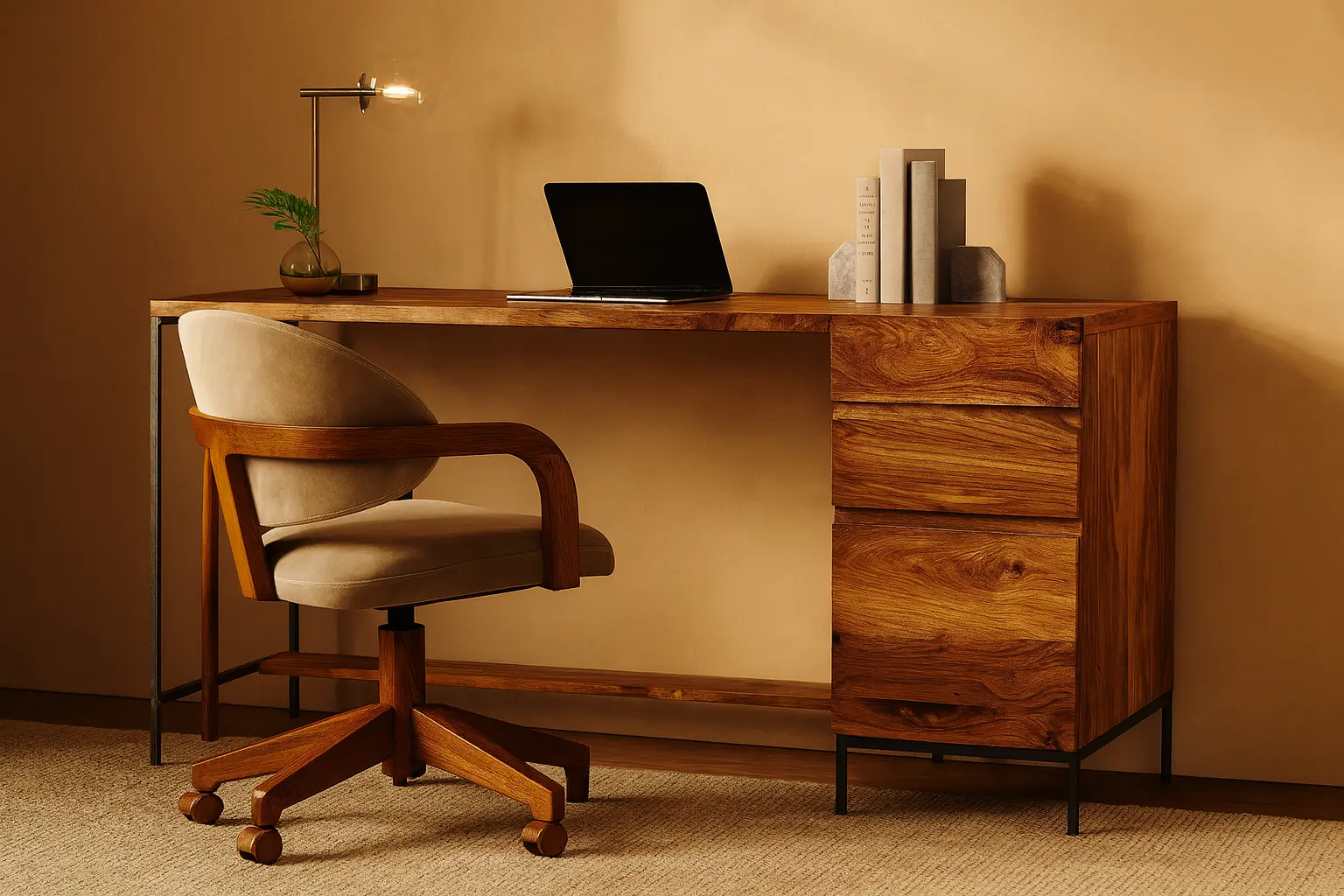
    If you have ever searched for a stylish remote work upgrade, you’ve probably come across the West Elm desk. It’s not just another trending item on Instagram or Pinterest. It’s the desk that remote professionals are constantly raving about, and for good reason! 

    I want to own one in place of what I already use. 

    Anyhow, with remote work becoming more permanent, your workspace now matters more than ever. A West Elm desk promises to bring both function and style to your workspace. But before you hit “Add to Cart,” let me take you through a thorough analysis of why you should consider the West Elm desks.

    Why the Hype? Understanding the West Elm Desk Appeal

    The West Elm desk has built a reputation for blending modern aesthetics with practical features. It stands out in a sea of bland furniture by offering something that feels both professional and homey.

    For starters, the brand has a clean, timeless design philosophy. That means your workspace looks polished, even if it’s part of your living room. Whether you’re into mid-century modern or minimalist vibes, there’s a wood desk style for every taste.

    Additionally, West Elm focuses on materials and finishes that last. From sustainably sourced woods to smart drawer placements, everything feels intentional. That’s not something you get with every desk on the market.

    If your current desk setup feels dull or chaotic, switching to a West Elm desk might spark joy and improve your daily routine.

    What Makes a Great Desk for Remote Work?

    Remote professionals need more than just a surface to put their laptop on. A good desk setup should support focus, organization, and comfort. Here’s what to consider:

    • Surface space: You’ll want enough room for your laptop, monitor, notebooks, and maybe a coffee mug or two.
    • Storage: Drawers and compartments can reduce clutter. A clean workspace makes a huge difference in productivity.
    • Cable management: Built-in cutouts or hidden trays keep wires out of sight.
    • Material: A wood desk feels warmer and more natural than metal or plastic. It adds charm to your space.
    • Design: It should match your interior and not feel like an afterthought in your home.

    With these boxes checked, you’re more likely to enjoy the time spent at your desk.

    Best West Elm Desks Based on Your Work Style

    Not every remote worker has the same needs. So let’s break down the best West Elm desk options based on different professional setups.

    1. The Compact Worker: Mid-Century Mini Desk

    If you live in a studio or small apartment, this desk is a lifesaver. It’s compact but doesn’t compromise on looks. With one or two drawers, it still keeps your items organized.

    Its sleek, wood desk finish brings warmth, while the tapered legs add a vintage charm. This desk setup works well for people who don’t need multiple monitors or massive storage.

    Despite its size, it feels elevated and cozy. Plus, it looks great in video calls. This desk is proof that small doesn’t mean boring.

    2. The Minimalist Pro: Parsons Desk

    This one is for the “less is more” crowd. The Parsons Desk has a clean and simple structure. No bulky drawers, no extra details, just a smooth wood desk surface with bold edges.

    It’s ideal for remote professionals who want an uncluttered environment. If your setup includes just a laptop and maybe a notebook, this desk is perfect.

    Pair it with a modern chair and a soft desk lamp to complete the look. It also doubles as a console table when not in use.

    3. The Multitasker: Industrial Modular Desk

    This desk is for those who juggle multiple roles. Maybe you work a 9-to-5 and freelance on the side. Or maybe your job requires two screens, tablets, and notebooks all at once.

    The Industrial Modular Desk from West Elm offers tons of surface area and smart storage. Its wood top is balanced with sleek metal legs, giving it an edgy but balanced feel.

    This setup also includes add-on shelving options. That helps keep important documents within reach without making your space feel messy.

    4. The Space-Saver: Ladder Shelf Desk

    If your workspace is part of a hallway or bedroom corner, consider this desk. The Ladder Shelf Desk uses vertical space rather than horizontal, saving you floor space.

    The top shelves are great for books, plants, or even personal touches like framed photos. The work surface is just enough for a laptop, a notebook, and a cup of tea.

    This desk setup feels more like a design piece than a workstation. But don’t be fooled—it’s as functional as it is stylish.

    5. The Deep Thinker: Writer’s Desk

    If your work involves writing, sketching, or planning, you’ll love this option. West Elm’s writer-style desks often come with deeper surfaces and clean layouts.

    The wood desk build gives a nostalgic touch that fuels creativity. There’s room to spread out your ideas without feeling cramped.

    These desks usually skip bulky storage for open space. This makes them ideal for long hours of brainstorming without distractions.

    West Elm Desk Quality: Is It Worth the Investment?

    Now, let’s talk value. A West Elm desk is definitely more expensive than a basic IKEA option. So is it worth it?

    Yes! if you value aesthetics, durability, and ethical sourcing. These desks are built to last. They don’t wobble or warp over time. Plus, most wood desk options are crafted from sustainably sourced materials.

    Many West Elm desks also arrive partially assembled, saving you frustration. Just add the legs and you’re good to go.

    While the upfront cost may be higher, the payoff is a workspace that feels good every day. That’s something you can’t put a price on.

    Desk Setup Tips to Pair With Your West Elm Desk

    Getting the desk is just the beginning. Your desk setup needs a few more touches to feel truly inspiring.

    • Use vertical organizers to free up desk space.
    • Add soft lighting like a warm-toned lamp.
    • Place a small plant to bring life to your setup.
    • Keep a wireless charger handy for your devices.
    • Invest in a comfy chair that matches your desk style.

    The right accessories elevate the vibe and make your desk setup feel intentional.

    Common Mistakes to Avoid When Buying a Desk

    Before clicking purchase, here are a few things to double-check:

    • Measure your space. You don’t want to guess and end up with something too big.
    • Think about storage. Some desks look pretty but offer zero practicality.
    • Check the material details. Make sure you’re getting real wood if that’s important to you.
    • Visualize your full desk setup. How will your monitor, keyboard, and lamp fit?

    By avoiding these mistakes, your investment will pay off in both style and comfort.

    West Elm Desk

    Final Thoughts

    A West Elm desk is not just a trending item. It’s a long-term partner in your remote work journey. Whether you’re a minimalist, multitasker, or creative spirit, there’s a style that fits your needs.

    The hype isn’t just noise. These desks are thoughtfully designed, beautifully crafted, and built to elevate your daily routine. Add in a few key accessories, and you’ve got a desk setup that feels like your own personal corner of productivity.

    So, if you’ve been wondering whether the West Elm desk is worth the buzz, it absolutely is. Just be sure to pick the one that aligns with how you actually work. Because the right desk doesn’t just hold your stuff. It supports your focus, your flow, and your future.

    Subscribe to What Works Next today and join a community dedicated to transforming the way we work. Working smarter starts here!


  • Mastering the Remote Work Future: Strategies for Long-Term Success

    Mastering the Remote Work Future: Strategies for Long-Term Success

    The remote work future is no longer a distant concept. It is our present and the way forward, and it is surely not going away anytime soon. 

    As we enter deeper into 2025, more people are adjusting to this flexible lifestyle and redefining success. From startups to large enterprises, companies are embracing remote work as a long-term strategy. But mastering it requires more than just setting up a laptop at home. You need structure, discipline, and the right mindset. 

    In this piece, we’ll explore strategies that help you not only survive but thrive in the future of remote work 2025.

    Why the Remote Work Future Matters More Than Ever?

    Remote work is no longer something new. It has become a standard way of doing business. The remote work future is shaped by evolving technology, changing mindsets, and global circumstances. While it brings freedom, it also requires responsibility. This shift is permanent, and being prepared can give you an edge.

    The future of remote work 2025 looks promising. Many companies are now hiring remote-first teams and investing in digital infrastructure. Employees enjoy flexibility, but they also face challenges like isolation, distractions, and blurred boundaries. The key lies in finding balance and structure.

    If you want to succeed, you need to develop habits and systems that support productivity and wellness. Whether you’re an employee or freelancer, your remote work approach must adapt to these long-term changes.

    Set a Solid Daily Routine

    One of the most powerful strategies is having a consistent daily routine. I know this may sound meh, “I am already doing it,” however, sometimes we aren’t actually. Without a clear start and end to your workday, it’s easy to overwork or underdeliver. A well-structured day creates mental clarity, which is needed the most.

    Begin with a morning ritual. Whether it’s coffee, a walk, or meditation, it sets the tone. Then, break your day into focused work blocks. Use timers or tools like the Pomodoro method to stay engaged. Also, include short breaks to reset your energy.

    A proper routine reduces decision fatigue. It helps you transition smoothly between work and personal life. The remote work future demands personal accountability. A reliable schedule is your foundation.

    Build a Dedicated Workspace at Home

    Your environment affects your performance. A designated workspace tells your brain it’s time to focus. Even a small corner can become your work zone. Make it clutter-free, simple, and functional.

    Good lighting, a comfortable chair, and essential tools can boost your productivity. Noise-canceling headphones and a stable internet connection are worth the investment. It is better to avoid working from your bed or couch as it reduces focus.

    This setup also helps if you’re learning how to work from home with kids. When your family sees a clear workspace, they respect your time more. It creates boundaries without saying a word.

    Communicate Clearly and Often

    Remote work thrives on strong communication. Since you can’t walk over to someone’s desk, you must be intentional. Use tools like Slack, Zoom, or Teams to stay in sync with your team.

    Always be clear in your messages. Confirm deadlines, ask questions, and update progress regularly. It avoids confusion and builds trust. Audio and video calls also add a personal touch that emails can’t.

    The future of remote work 2025 will rely heavily on asynchronous communication. Learn how to document ideas well, communicate them well with comprehension. When in doubt, over-communicate. It’s better to repeat than to be misunderstood!

    Prioritize Work-Life Balance

    Without a commute, work can seep into your evenings. That’s why you must set clear boundaries for your own sake. Define your work hours and stick to them no matter what. Shut down your computer once your workday ends and open it only when the next working day starts!

    Plan personal time just like meetings. Schedule breaks, meals, workouts, and fun activities. Don’t skip vacations even if you’re working from home. Your mind and body need time to rest and recharge.

    If you’re figuring out how to work from home with kids, balance is even more critical. Have blocks of time where you’re fully present for them. Involve your partner or family for support. Create a shared calendar to avoid overlap.

    Keep Learning and Upskilling

    The remote work future belongs to those who evolve. Technology and job roles are shifting rapidly. You need to keep learning to stay competitive. Luckily, remote work gives you more control over your time only if you discipline your time. 

    Take online courses, attend webinars, and read industry blogs. Platforms like Coursera, LinkedIn Learning, and YouTube offer plenty of resources. Set a goal to learn one new skill every quarter.

    Upskilling also keeps your mind sharp and motivated. You will feel more confident and relevant in the industry you are working in. It’s a great way to stay ahead in the future of remote work 2025.

    Maintain Social Connections

    One common downside of remote work is loneliness. Without daily human contact, you may feel disconnected. That’s why you must make an effort to connect with others.

    Have regular virtual coffee chats with coworkers. Join online communities related to your industry or interests. Attend virtual events or meetups. If possible, plan occasional in-person meetings.

    Social connection is vital for emotional well-being. It also improves team collaboration and creativity. In the remote work future, relationships still matter. You just need to be more intentional about nurturing them.

    Embrace Flexibility with Discipline

    Remote work offers freedom, but too much flexibility can backfire. It’s easy to procrastinate when no one is watching. That’s why discipline is essential. Stick to your plan even when you don’t feel like it.

    At the same time, allow room for adjustments. If your child is sick or there’s a family emergency, give yourself grace. Reschedule your tasks without guilt. Discipline means making smart choices, not rigid rules.

    The remote work future favors those who are flexible but focused. You can’t control everything, but you can control how you respond.

    Stay Organized with the Right Tools

    To stay on top of your work, use tools that simplify your tasks. Project management apps like Trello, Asana, or Notion can keep you organized. Google Calendar helps you plan your day better.

    Time tracking tools give insight into how you spend your time. Password managers save you from the chaos of remembering logins. Cloud storage makes file sharing easy.

    With so many digital tools available, find what works best for you. The right setup can reduce stress and improve productivity. In the remote work future, your tools are your virtual office.

    Take Care of Your Mental and Physical Health

    Success in remote work is not just about tasks and deadlines. Your health plays a big role. Prioritize movement throughout your day. Stretch, walk, or do short workouts between meetings.

    Eat nutritious meals and drink enough water. Sleep well and avoid too much screen time. Schedule time for hobbies and things you enjoy. These habits add joy and reduce burnout.

    If you feel overwhelmed, talk to someone. Many companies offer mental health support. In 2025, the future of remote work includes emotional well-being. You are not a machine! 

    Take care of yourself, because you matter.

    Create a Plan for Long-Term Success

    Finally, treat remote work as a long-term career model. Think beyond daily tasks. Where do you see yourself in the next three years? What kind of work excites you? What skills do you need?

    Set long-term goals and break them into small steps. Review your progress every few months. Adjust your goals if needed. Having a vision keeps you motivated.

    The remote work future is not just about surviving today. It’s about designing a life you truly want. With the right mindset and strategies, long-term success is absolutely within reach.

    Final Thoughts

    The remote work future is here to stay! 

    It brings challenges, but also endless possibilities. If you’re ready to thrive, start building smart habits now. Use your time wisely, take care of yourself, and keep learning.

    Whether you’re exploring the future of remote work 2025 or figuring out how to work from home with kids, your journey is valid. With the right approach, you can enjoy both productivity and peace. After all, the future is not just about work. It’s about creating a life that works for you.

    Subscribe to What Works Next today and join a community dedicated to transforming the way we work. Working smarter starts here!

  • How to Manage Working From Home With Kids Smoothly

    How to Manage Working From Home With Kids Smoothly

    Working from home with kids can be both rewarding and overwhelming. You’re trying to attend meetings, respond to emails, and meet deadlines, all while navigating snacks, sibling disputes, and background noise. The truth is, working from home with kids requires more than just multitasking. It takes strategy, patience, and flexibility.

    I have jotted down this guide to help you strike a balance between productivity and parenting, offering actionable tips, smart setups like a portable office, and useful tools, such as an adjustable laptop stand. 

    Whether you’re working remotely full-time or managing a hybrid schedule, these strategies will surely help you stay on track without sacrificing your sanity.

    Set Realistic Expectations from the Start

    One of the first steps to working from home with kids is managing your expectations. You won’t always get everything done, and that’s okay. Some days will feel smooth, others chaotic. Setting realistic goals helps reduce stress.

    Start by identifying your must-do tasks each day. Then, be flexible about how and when you’ll complete them. For example, if your toddler naps at 1 PM, plan your focused work around that time. You may also need to work early in the morning or after bedtime.

    Talk openly with your team about your situation. Transparency helps manage workloads and deadlines. Most colleagues will appreciate your honesty and adjust accordingly.

    Create a Dedicated Portable Office Space

    When your workspace doubles as your dining table or couch, things get messy fast. Having a portable office setup allows you to move around the house with ease while keeping your essentials together.

    Use a compact storage bin, rolling cart, or bag to carry your laptop, notepad, pens, and chargers. This helps you transition smoothly between locations, whether you’re working in the kitchen during breakfast or moving to the bedroom for quiet.

    A portable office not only adds flexibility but also helps kids understand when you’re “at work.” When they see your setup, they’ll gradually learn it’s time to let you focus.

    Use an Adjustable Laptop Stand for Comfort

    Comfort is key when you’re working long hours from home. An adjustable laptop stand makes a big difference in your posture and productivity. It helps elevate your screen to eye level, reducing neck and back strain.

    You can easily place the stand on any surface, from your kitchen counter to your bedside table. If your kids are playing in the living room, move there with your laptop stand and stay productive while keeping an eye on them.

    This tool is especially helpful when you can’t dedicate one desk space. It lets you create a mini workstation wherever you are.

    Build a Flexible Routine That Includes the Kids

    Kids thrive on routine, but so do parents. The key is flexibility. Create a general schedule that includes your work hours, playtime, meals, and screen time. Share this plan with your kids in simple terms.

    For example, you can say, “When the big hand is on the 12, I’ll play with you.” Visual cues like timers or colorful calendars work great for younger kids.

    Having a structure helps kids know what to expect. It also gives you blocks of time to focus. Try including your children in the planning process. Letting them choose activities makes them more engaged and cooperative.

    Plan Your Day Around High-Energy and Low-Energy Times

    Observe your kids’ energy levels. Are they more active in the morning? Do they get tired in the afternoon? Align your work schedule with these patterns.

    Use quieter times for deep work. During high-energy moments, schedule lighter tasks or take short breaks to engage with your kids. You’ll avoid frustration and maintain a better work-life flow.

    If you’re lucky enough to have help from a partner or family member, alternate shifts to manage the load. Divide responsibilities so you each get dedicated work windows.

    Create a Backup Activity Box

    You won’t always have time to entertain your children. That’s why a backup activity box is a lifesaver. Fill it with puzzles, books, sticker sets, or art supplies. These should be activities they can enjoy independently.

    Introduce this box only during your work blocks. It becomes a special treat and keeps their interest high. Rotate items weekly to keep them fresh and exciting.

    Older kids can work on homework or have quiet reading time. For toddlers, try simple games or educational apps. Just ensure screen time is balanced with other creative play.

    Set Boundaries Without Guilt

    It’s tempting to drop everything when your child calls for you, but setting boundaries is necessary. Use clear but gentle language like, “I’m working right now, but I’ll be with you in 15 minutes.”

    You can also create visual cues. A colored sign on your door or desk can signal when you’re available. For younger kids, use gestures or stickers to make it fun.

    Boundaries help children understand your work needs without feeling rejected. Over time, they’ll respect these limits and learn patience.

    Embrace Screen Time Strategically

    Not all screen time is bad. Educational shows or interactive apps can be engaging and beneficial. The key is to use screen time with intention.

    Schedule short periods during your important calls or deadlines. Choose quality content and discuss it with your kids afterward to stay involved.

    Pairing screen time with snacks or quiet time can also help create a calm window for focused work. Just remember to follow it with physical play or connection time.

    Take Advantage of Nap Time and Quiet Time

    If you have younger children, nap time is your golden hour. Use it wisely. Prioritize tasks that require the most focus. Avoid doing chores during this time unless absolutely necessary.

    For older kids who no longer nap, introduce quiet time. This could include audiobooks, puzzles, or quiet crafts. It trains them to enjoy independent time while you stay productive.

    Be consistent with nap or quiet time each day. Even 30 – 60 minutes of silence can reset your energy and help you catch up.

    Accept That Interruptions Will Happen

    You might be in the middle of a Zoom call when someone spills juice or cries for help. It’s okay. These moments are part of the reality of working from home with kids.

    Rather than stress over perfection, embrace the mess. Most colleagues are understanding, especially post-pandemic. If your child shows up on camera, smile and carry on.

    The more you normalize interruptions, the less anxiety they cause. Plan around them when possible, but don’t let them derail your day.

    Prioritize Self-Care and Short Breaks

    You cannot pour from an empty cup. Caring for your own well-being is just as important as meeting deadlines. Take short breaks between tasks. Stretch, hydrate, breathe, or step outside.

    Working from home with kids often leads to skipped meals and scattered thoughts. A quick five-minute reset can help you return more focused.

    If possible, reserve a small corner just for you. Even a quiet reading chair or candle-lit nook helps create boundaries between work, parenting, and rest.

    Communicate With Your Partner or Support System

    If you’re not doing this alone, communication is everything. Share your schedules, work priorities, and challenges. Tag-team where possible. Maybe one of you handles mornings while the other covers afternoons.

    If you have no in-home support, reach out to friends or family for help. Even a 20-minute virtual call with grandma can entertain the kids while you tackle a task.

    Don’t be afraid to ask for support. No one expects you to juggle it all alone.

    Reflect and Adjust Weekly

    Every family is different. What works for one household may not work for yours. That’s why it’s important to reflect each week. Ask yourself: What worked well? What felt stressful? What can we tweak?

    Make it a Sunday ritual. Adjust schedules, activity boxes, and expectations accordingly. When you stay flexible and responsive, your family finds its own rhythm.

    Progress will not be perfect, but each week brings more insight and ease.

    Final Thoughts

    Working from home with kids is a unique challenge, but it’s not impossible. With the right tools like a portable office and an adjustable laptop stand, a flexible routine, and realistic expectations, you can find your flow.

    Some days will feel chaotic, others surprisingly peaceful. But with intention, structure, and self-compassion, you’ll create a system that works for your family.

    And remember every small win counts. A completed task, a calm call, or even a shared snack break are all signs you’re doing just fine.

    Subscribe to What Works Next today and join a community dedicated to transforming the way we work. Working smarter starts here!

  • Preparing Your Team for the Remote Work Future

    Preparing Your Team for the Remote Work Future

    The remote work future is not just approaching. It was always here, but the boom occurred after the infamous COVID-19. As more companies embrace flexibility, hybrid models, and fully remote teams, leaders must rethink how they support employees. If your team is not prepared for the shift, productivity and morale can quickly take a hit. Don’t you think?

    Thankfully, preparing your team for the remote work future does not have to be overwhelming. With the right tools, culture, and structure, you can create an environment that supports collaboration, focus, and wellbeing. 

    Here, I will walk you through the key areas in order to help your team transition smoothly and sustainably without any hiccups.

    Why the Remote Work Future Is Inevitable

    The global pandemic fast-tracked what many experts had predicted. Remote work is no longer a perk. It has become a part of the modern workplace. Employees have proven they can thrive from anywhere, only if they are allowed to (if you know, you know). 

    However, finally, employers are realizing the cost savings and productivity gains that come with remote or hybrid work models.

    In many industries, offering flexibility is a competitive advantage. Companies that resist change may struggle to attract top talent. On the other hand, those who prepare for the remote work future now will be better positioned for growth.

    This shift calls for more than just new software. It requires a mindset change across leadership, HR, and team culture.

    Establishing the Right Remote Work Culture

    Culture is the backbone of any remote team. Without face-to-face contact, it becomes more important to create intentional routines and clear communication.

    First, set clear expectations around work hours, response times, and meeting schedules. A culture of trust also encourages people to take ownership of their tasks. Let your team know that output matters more than clocking in and out.

    Regular check-ins are important. But instead of micro-managing, focus on goals and outcomes. Encourage open feedback and celebrate wins, big or small. Transparency helps everyone stay aligned and feel connected.

    Many remote leaders also recommend setting up virtual rituals. This can be as simple as weekly team calls, shout-outs in group chats, or coffee breaks over video. These habits help build team spirit even when people are working miles apart.

    Investing in Tools That Support Remote Success

    Having the right tools in place can make or break your remote setup. Communication and collaboration tools are essential. Slack, Mattermost, Microsoft Teams, or Zoom have become standard, but they must be used with intention.

    It is equally important to provide project management tools like Basecamp, Trello, Asana, or ClickUp. These help teams track work, share updates, and stay accountable. Cloud-based document storage, such as Google Drive, iCloud, or Dropbox, is also necessary.

    When selecting tools, keep the user experience in mind. If a tool is clunky or hard to learn, adoption will be slow. It is also a good idea to limit the number of tools you use. Too many platforms can confuse team members and reduce productivity.

    Beyond software, make sure your team is equipped with the right hardware. Fast internet, noise-cancelling headphones, and ergonomic setups all contribute to focus and performance.

    Encouraging Modern Home Office Setups

    A modern home office plays a big role in remote work success. If your team is working from their beds or couches, it can lead to poor focus and physical strain.

    While you cannot control everyone’s space, you can offer guidance and support. Start by providing a stipend or budget for employees to upgrade their work areas. This can cover essentials like a proper desk, chair, and lighting.

    You might even suggest accessories that enhance comfort. A height-adjustable laptop table, wrist support, or footrest can make a big difference during long work hours.

    Workshops on posture and workspace setup can also help employees optimize their environment. When people feel physically supported, they show up more energized and focused.

    Training Managers to Lead Remote Teams Effectively

    Leadership styles must evolve to match remote dynamics. Managing remote teams is different from managing in-office teams. You cannot rely on hallway conversations or spontaneous check-ins.

    This means managers need to be more intentional about how they communicate and motivate. Offer training on how to run effective virtual meetings, give feedback, and manage performance.

    Empathy is also critical. Remote work can blur the line between personal and professional life. Leaders must be able to support team members through challenges like burnout or isolation.

    Performance reviews should be based on outcomes, not time online. Encourage managers to focus on setting clear goals and measuring results. This creates a fairer system and motivates employees to work smarter, not longer.

    Creating Boundaries to Support Work-Life Balance

    One common challenge of remote work is the lack of boundaries. When your home is your office, it is easy to stay “on” all the time. This leads to stress and burnout over time.

    To avoid this, encourage your team to set firm start and end times for their day. Suggest turning off notifications after hours and stepping away from screens during breaks.

    It also helps to designate a dedicated workspace, even if it’s just a small laptop table in the corner. This physical boundary can help mentally separate work from home life.

    Leaders can lead by example here. If managers are sending late-night emails, others may feel pressure to do the same. Promote a culture that values rest and personal time.

    Fostering Communication and Connection

    Without casual office chats, remote teams can feel disconnected. That is why it’s important to build communication habits that keep everyone in the loop.

    Use asynchronous tools like Loom or Notion to reduce meeting overload. Encourage team members to share updates, questions, or wins regularly.

    Virtual team-building can also help strengthen bonds. Try online games, informal Slack channels, or monthly challenges that get people talking.

    The key is to make connections easy and low-pressure. Some team members may not enjoy forced fun. Offer a mix of options and let people join when it feels right for them.

    Planning for Flexibility and Long-Term Growth

    Remote work is not one-size-fits-all. Some team members may prefer quiet home offices. Others may thrive in coworking spaces or shared setups.

    Rather than dictating one model, aim for flexibility. Provide options for hybrid work, asynchronous schedules, and location independence.

    Also, check in with your team regularly. Needs will change over time. By staying open to feedback, you can adapt your policies and tools to support long-term success.

    This is not a short-term experiment. The remote work future is evolving, and the most successful teams will evolve with it.

    remote work future

    Final Thoughts

    The remote work future is here, and teams that embrace it will thrive. While the shift can feel uncertain, it offers incredible opportunities for growth, flexibility, and innovation.

    Start by building a strong culture, supporting modern home office setups, and providing tools that enhance collaboration. Train your leaders to manage with empathy. Encourage boundaries to prevent burnout. And most importantly, stay adaptable.

    If you prepare your team today, you will not only meet the moment, you will lead the way into the future of work!

    Subscribe to What Works Next today and join a community dedicated to transforming the way we work. Working smarter starts here!

  • Is Work From Home Still Available in 2025?

    Is Work From Home Still Available in 2025?

    If you’re wondering, “Is work from home still available in 2025?” you’re not alone. Many professionals, including myself, are curious whether remote work is here to stay or fading away. The answer might surprise you. 

    While the pandemic was the big push, the flexibility and benefits of remote work are still shaping how people work today. Let’s see what’s changed, what remains, and how you can thrive in this evolving landscape.

    The Current State of Remote Work in 2025

    Remote work hasn’t disappeared. Instead, it has matured. In 2025, many companies have embraced hybrid models. Some roles remain fully remote, especially in tech, digital marketing, design, and customer service.

    Many professionals still ask, ‘Is work-from-home still available in 2025 for non-tech fields?’ Absolutely. Roles in education, healthcare support, HR, and finance have remote opportunities now more than ever. As long as productivity tools and video conferencing apps keep evolving, remote jobs will stay relevant.

    Moreover, global hiring has increased. Companies are open to hiring talent across borders, offering more chances to work from home, no matter where you live.

    Why Remote Work Still Makes Sense

    There are clear reasons why remote work has stuck around. First, it saves costs for both employers and employees. Companies spend less on office space, and employees save on commuting and meals.

    Second, employees are happier and more productive. Many report better focus and a healthier work-life balance. They also enjoy the freedom to set up their own work environment. You can choose your chair, monitor, or even add the best desk accessories to boost your mood.

    Third, technology supports it. From team collaboration tools to project management platforms, the digital infrastructure has only improved.

    Popular Industries Still Hiring Remote Workers

    You might think remote work is mostly for tech professionals. But that’s no longer the case. Several industries offer remote options even in 2025:

    • Education:
      Online tutoring and curriculum development are still in high demand.
    • Marketing:
      Content creators, strategists, and analysts often work remotely.
    • Customer support:
      With AI tools, remote agents can now handle complex issues too.
    • Finance:
      Bookkeeping, accounting, and financial consulting are mostly remote-friendly.
    • Healthcare support:
      Medical transcriptionists and telehealth support staff can work from home.

    If you’re in one of these fields, you don’t need to ask, “Is work from home still available in 2025?” It clearly is.

    How Hybrid Work Fits into the Picture

    While some companies are fully remote, many have shifted to hybrid setups. This means working from home part of the week and going to the office on select days.

    Hybrid work allows face-to-face collaboration while offering flexibility. It’s a sweet spot for many professionals. Some say it’s the best of both worlds.

    If your employer offers this model, take advantage of it. You’ll still need to maintain a productive home workspace. Stock up on office basics like a good chair, keyboard, and lighting.

    What Makes a Home Office Work in 2025

    You don’t need a huge room to work well from home. A dedicated corner with the right setup works perfectly. Here are some essentials to keep you productive:

    • A reliable desk and ergonomic chair
    • High-speed internet and backup connectivity
    • Noise-canceling headphones for virtual meetings
    • A good lighting source to avoid strain
    • Storage for documents and cables

    Investing in the best desk accessories helps you stay organized and inspired. Think cable organizers, desktop shelves, or even a desk plant for freshness. It’s about creating a space where you actually enjoy working.

    Remote Work Trends to Watch This Year

    Remote work is not static. It’s constantly evolving. In 2025, several trends are worth noting:

    • Async communication is growing. Teams now focus on work without needing to reply instantly.
    • Global work forces are more common. Remote tools have erased borders.
    • Workations are popular. Professionals now work while traveling.
    • AI integration is stronger than ever. Many routine tasks are automated.
    • Well-being support is prioritized. Employers care more about mental health and offer virtual support tools.

    These trends show that remote work isn’t fading. It’s simply changing to fit modern needs.

    Common Myths About Remote Work in 2025

    You may hear people say remote work is ending. Let’s clear up some myths:

    • Myth 1:
      Remote workers are less productive.
      Reality: Most studies show higher productivity at home.
    • Myth 2:
      Remote jobs are low-paying.
      Reality: Many high-paying roles are fully remote.
    • Myth 3:
      Only young people work remotely.
      Reality: Workers of all ages enjoy the flexibility.

    So next time you hear someone question, “Is work from home still available in 2025?” you’ll know the answer is a confident yes.

    Tips to Thrive While Working from Home

    Whether you’ve been remote for years or just started, it’s smart to optimize your workflow. Try these tips to make the most of it:

    • Set boundaries. Create clear start and end times.
    • Use time blocks. Focus on one task at a time.
    • Take regular breaks. Short walks help refresh your mind.
    • Stay connected. Schedule virtual check-ins with your team.
    • Declutter often. Use trays or drawers to manage your office basics.

    Also, upgrading to the best desk accessories can improve comfort and efficiency. Even something as small as a mousepad with wrist support can make a difference.

    What Employers Expect from Remote Employees in 2025

    Working from home in 2025 comes with some expectations. Employers value:

    • Clear communication. Be proactive and responsive.
    • Time management. Stay organized without needing supervision.
    • Tech proficiency. Know your tools and troubleshoot common issues.
    • Accountability. Meet deadlines and own your work.

    If you can meet these standards, remote work is yours to keep.

    Is It Time to Go Back to the Office?

    Not necessarily. While some companies require on-site work again, many offer choices. If your job allows, you may continue working from home indefinitely.

    However, being flexible helps. Some roles might involve occasional meetings or events. Just be open to hybrid setups when needed.

    For most people wondering if work from home is still available in 2025, the opportunity is very much alive. But you need to prove your value and adjust to the times.

    Final Thoughts

    So, is work from home still available in 2025? Yes, and it’s thriving in new ways. Companies are more open to remote setups than ever. Workers are setting up better home offices. Technology is keeping us connected, productive, and on track.

    If you’re ready to embrace it, make sure you’re prepared. Gather your office basics, stay informed about trends, and always keep improving your skills.

    Remote work is no longer just a perk. It’s a permanent part of the modern workplace.

    Subscribe to What Works Next today and join a community dedicated to transforming the way we work. Working smarter starts here!

  • Who Invented Remote Work? Evolution of WFH Jobs

    Who Invented Remote Work? Evolution of WFH Jobs

    If you’ve ever found yourself Googling who invented work from home, you’re not alone. I had the same curiosity. Many people, including you, must assume it’s a recent concept born out of the digital age. In reality, the idea of working from home has a surprisingly long and fascinating history. 

    While the modern version of remote work is powered by Wi-Fi and Zoom calls, the roots go back centuries. Understanding how this concept has evolved can help us appreciate how far we’ve come and where we might be headed next. And I would really like to thank the one who invented work from home! Lol.

    Let’s dive into the history, key moments, and future of remote work while uncovering who invented this lifestyle that now defines our work lives. So, pull up your comfy chair, sit at your favorite work station or work table, and enjoy the ride.

    The Origins: Work from Home Before It Was Cool

    Before anyone asked who invented work from home, people were already doing it. Working from home was the norm before the Industrial Revolution. Think blacksmiths, shoemakers, bakers, and farmers. These jobs were centered in homes or small workshops.

    People used basic tools and tables as their work stations. Their homes doubled as their offices and production spaces. There was no commute, no office cubicle, and certainly no coffee machine in the hallway. It was pure home-based labor rooted in necessity.

    This setup worked well for centuries. However, things began to change rapidly once the Industrial Age arrived.

    The Industrial Revolution: Goodbye Home, Hello Factory

    As factories emerged, people moved away from home-based work. Mass production required labor to be centralized. Workers now clock in at large industrial sites instead of their homes. This shift changed everything, literally. It pulled people into cities and a more rigid 9-to-5 schedule (yes, the one most of us are still stuck in).

    The work table at home was replaced by a workbench in a noisy factory. The personal touch of home life faded into standard procedures and schedules. Yet, even during this transformation, a few professions still allowed for home-based work, such as sewing or writing.

    Still, the question of who invented work from home hadn’t been asked yet, because for a while, the idea seemed outdated and impractical.

    The Mid-20th Century: Remote Work Makes a Quiet Comeback!

    Fast forward to the 1960s and 70s. With new technologies like the telephone and typewriter, the concept of telecommuting began to appear. Some professionals started doing a portion of their work at home. Writers, consultants, and architects could send documents by fax or mail and continue working without needing to be present in an office every day.

    Then came Jack Nilles. A name you’ll want to remember! 

    He’s often credited when people ask who invented work from home. In 1973, Nilles coined the term “telecommuting” while working on a project for NASA. His idea was simple: “Instead of bringing people to work, bring work to the people”. Nilles laid the groundwork for what would later explode into the remote work revolution. 

    So, while he didn’t “invent” working from home, he formalized the concept and proved that it could be both efficient and productive.

    The Computer Age: Remote Work Gets a Tech Boost

    The 1980s and 90s brought a wave of personal computers, floppy disks, and later the internet. Suddenly, remote work became more than just a theory. People could now send emails, work on shared documents, and connect virtually with colleagues.

    Companies like IBM started experimenting with remote work policies. In fact, by the late 1980s, IBM had thousands of employees working from home. They used early forms of intranet and dial-up connections to stay connected. At this point, the question of who invented work from home was less relevant than the realization that it could work on a larger scale.

    By the 1990s, the rise of dot-com companies added fuel to the fire. These tech firms were more flexible and open to remote work, especially for developers, writers, and creatives. Still, many businesses remained hesitant.

    The 2000s: The Digital Shift Accelerates!

    In the early 2000s, broadband internet, laptops, and mobile phones made it easier to work from anywhere. New platforms like Google Docs, Skype (now retired), and Dropbox appeared, allowing real-time collaboration. More startups began offering remote positions, especially in tech and marketing.

    Still, many corporate giants insisted on office culture. Even companies that pioneered remote work sometimes pulled back. IBM, for example, reversed its remote work policy in 2017, citing a need for closer collaboration.

    But the tools kept improving. The average work station now includes a laptop, a second monitor, and an ergonomic chair. The work table transformed into a dedicated workspace with all the bells and whistles.

    2020: The Pandemic That Changed Everything

    No blog on the evolution of remote work is complete without mentioning COVID-19. In 2020, the global pandemic forced companies to switch to remote work almost overnight. Zoom calls replaced meetings. Slack became the new office hallway. Dining tables turned into work tables.

    Even the most traditional companies were suddenly remote-first. And guess what? Productivity didn’t collapse. In many cases, it improved! 

    I completely transitioned from a full-time office employee to a work from home employee. The only good thing that came out of COVID-19.

    Millions asked who invented work from home during this period, assuming it was a new concept. In reality, the situation simply pushed a long-brewing trend into the spotlight.

    Post-Pandemic World: Hybrid Models and WFH Norms

    Now, remote work is not just an option. It’s often an expectation. Many companies have shifted to hybrid models. Others have gone fully remote. Teams collaborate across time zones and continents without missing a beat.

    Employees have upgraded their work stations, adding things like standing desks, large screens, and noise-canceling headphones. The humble work table has transformed into a customized, productivity-enhancing hub.

    Moreover, remote-first companies like GitLab and Zapier have built their entire culture around working from home. They’ve shown that remote work is not just possible. It can be a competitive advantage.

    The Benefits That Keep Remote Work Growing

    The popularity of remote work is tied to real benefits. It saves time, reduces stress, and supports a better work-life balance. People no longer spend hours commuting. Instead, they reclaim that time for family, exercise, or creative pursuits.

    Companies benefit too. They can access talent from anywhere. They save money on office space. And they often see increased job satisfaction among employees.

    Even though not all jobs can be done remotely, the ones that can are increasingly staying that way. Employees are building better work stations at home. Employers are offering stipends to improve those setups. The work table is now part of a fully equipped mini office.

    So, Who Really Invented Work From Home?

    If we’re being technical, nobody invented it. It has always existed in some form. But if you’re looking for a modern figure behind the remote work movement, Jack Nilles deserves the credit.

    His research and early advocacy laid the foundation for telecommuting. He showed that remote work could be just as effective as office work, even without today’s advanced tools.

    But really, the story of who invented work from home is a collective one. It includes early craftsmen, forward-thinking technologists, and modern workers adapting to change. It’s a story of evolution, not invention!

    who invented remote work

    Final Thoughts

    Remote work is here to stay, and that’s for sure. The internet buzzes on and off about remote work being vanishing, but it’s not.  

    The journey from ancient workshops to digital offices has been long, but it shows no signs of slowing down. Whether you’re building your ideal work station or customizing a sleek new work table, you’re part of a centuries-long evolution.

    So the next time someone asks who invented work from home, you can smile and say it’s a story that’s still being written.

    Subscribe to What Works Next today and join a community dedicated to transforming the way we work. Working smarter starts here!

  • How to Choose the Right Executive Desk for Home Use

    How to Choose the Right Executive Desk for Home Use

    Choosing the right executive desk for home office can change how you feel about work. It can boost your productivity, help you stay organized, and even make your workspace feel more inviting. If you spend a lot of time working from home, this one piece of furniture can either become your best investment or your biggest regret. So, you’ve got to choose wisely. I spent days reading reviews, comparing prices, and examining features before purchasing the one that seemed most aligned with my needs.

    So, how do you decide which desk is right for you? Let’s walk through what you need to know from size and material to storage and design. Whether you’re setting up a brand-new office or upgrading your current setup for a work-from-home (WFH) setup, this guide will help you make the best choice.

    Consider the Size of Your Space

    Before falling in love with a desk online, take a good look at your home office. Do you have a dedicated room, or are you working from a corner of your bedroom or living room? Size matters, especially when you’re working with limited space.

    A large executive desk for home office may feel luxurious, but if it cramps your walking area or blocks natural light, it’s not the right fit. Measure your space before browsing. Then, stick to those dimensions when shopping. It might feel tempting to go bigger, but trust me, comfort and movement are just as important as the look.

    Additionally, remember to factor in legroom and space for a chair. If you’re tight on space, consider an L-shaped desk with storage. It gives you more surface area without taking up too much room.

    Choose a Style That Matches Your Interior

    Your desk should reflect your personality and also complement the look of your home. A traditional wooden desk with a polished finish gives off a classic vibe. On the other hand, a sleek, minimal design in white or matte black might suit a modern setup better.

    Now that more people are working from home, furniture companies offer a wide range of stylish options. You no longer have to settle for something bulky and boring. Think of your executive desk for home office as a design piece as much as a functional one.

    Try to visualize the desk in your room. Will it go well with your existing furniture? Does the color match your floor or walls? These small details can make a big difference in how your space feels.

    Think About Storage Needs

    If you’re someone who likes to keep everything neatly stored away, don’t overlook storage. A desk with drawers can help you keep paperwork, office supplies, and electronics out of sight. This is especially useful if you want your workspace to feel clean and calm.

    There are desks with shallow drawers for pens and sticky notes, and there are desks with deep drawers for files and folders. Some even offer built-in shelves or side cabinets, turning your desk into a full workspace.

    For multitaskers, a desk with storage becomes a lifesaver. It helps you avoid clutter, saves time searching for items, and keeps your mind focused. After all, a clean desk really can lead to a clearer mind.

    Pick a Material That Suits Your Lifestyle

    The material of your desk affects both its appearance and durability. Solid wood is a great long-term investment if you want something sturdy and traditional. However, it’s heavier and usually more expensive.

    Laminate and MDF desks are more budget-friendly and come in many styles and colors. If you’re into modern or industrial looks, glass or metal might appeal to you, though they require more maintenance.

    Since your executive desk for home office will likely face daily use, think practically. If you eat at your desk or have young kids around, avoid materials that stain or scratch easily. A balance between style and function is key.

    Don’t Ignore Ergonomics

    Looks aren’t everything. A desk that doesn’t support good posture can lead to discomfort over time. Always check the height of the desk and make sure it allows your arms to rest comfortably when typing. If it’s too high or low, you’ll find yourself straining your neck and back.

    Pair your desk with a supportive chair. If you’re petite or tall, you might need to consider adjustable height desks. Your comfort should always be a top priority, especially if you’re working long hours from home.

    A good executive desk for home office will keep you productive, but also relaxed and physically supported. Comfort leads to better focus and fewer distractions during work hours.

    Factor in Cable Management

    Most of us have laptops, monitors, printers, and phone chargers cluttering our workspace. Without good cable management, it quickly becomes a mess. When choosing your desk, look for built-in grommets, cable trays, or cutouts that allow you to tuck wires away.

    If your desk doesn’t offer cable management features, consider adding external organizers. Velcro straps, under-desk baskets, and adhesive clips can make a huge difference.

    Having a desk with drawers also helps you hide away charging stations or store tech accessories. That way, your desk looks clean even when it’s powering multiple devices at once.

    Choose a Design That Inspires You

    Your home office is a space you visit every day. So why not make it inspiring? Think about what kind of space makes you feel motivated. Is it light and airy with neutral tones? Or maybe you feel more creative in a bold, colorful setup?

    An executive desk for home office can easily become the centerpiece of your room. Whether it’s a rustic design with warm textures or a high-gloss surface with sharp lines, pick something that makes you look forward to sitting down at your desk.

    Don’t underestimate the emotional value of your workspace. When your environment reflects your taste, you feel more connected to your work.

    Budget Smartly

    You don’t have to spend a fortune to get a great desk. But it’s also not worth choosing the cheapest one just to save a little. Look at this as a long-term investment. If your desk wobbles or chips within a few months, you’ll end up paying more to replace it.

    Compare prices, read reviews, and think about what features matter most to you. A desk with storage might cost a bit more, but if it helps you stay organized, it’s probably worth it.

    You can also check out refurbished or second-hand options. Many quality desks are available at lower prices if you know where to look.

    Assembly and Delivery Matter Too

    It’s easy to forget this part until the desk shows up at your door in five separate boxes. Before you order, check if the seller offers assembly services. If not, make sure the instructions are clear and that you have the tools you need.

    Some executive desks for home office are easy to put together, while others may require help. It’s also worth checking if the desk can fit through your doorways and hallways, especially for larger or pre-assembled models.

    Delivery time is another important detail. If you’re in a hurry to set up your space, avoid backordered products or long shipping delays.

    Get Input from Real Users

    Finally, always read the reviews. Customer feedback gives you insight into real experiences, beyond what the product description tells you. You’ll learn how the desk holds up over time, how easy it is to clean, and whether the desk with drawers has enough space.

    Don’t just look at the star rating, read what people liked and didn’t like. It helps you avoid surprises after your purchase.

    You can also ask friends or colleagues who work from home. Sometimes the best advice comes from someone who’s already gone through the process.

    Final Thoughts

    Picking the right executive desk for home office is more than just a shopping decision. It’s about creating a space that supports your daily workflow, matches your style, and keeps you organized and comfortable.

    Whether you need a desk with storage for all your files or a stylish desk with drawers that adds charm to your space, there are endless options out there. Just be sure to choose with intention. Think about your habits, your workspace size, and how you want to feel when you sit down every morning.

    After all, your desk isn’t just a piece of furniture. It’s where your goals come to life.

  • How to Connect Two Monitors to One Computer Easily

    How to Connect Two Monitors to One Computer Easily

    If you’ve ever felt cramped while working on just one screen, you’re not alone. We’ve all been there, especially the digital geeks who are required to work on multiple tasks at once. Knowing how to connect two monitors to one computer can seriously upgrade your workspace. Whether you’re trying to boost productivity, manage multiple tasks, or enjoy more screen space while gaming, a dual monitor setup can make everything smoother. It’s not complicated, and with the right steps, anyone can set it up at home.

    Let’s walk through how to make this happen without any confusion.

    Why Use Two Monitors?

    Using two monitors means you can view different applications side by side. This saves time and effort switching between tabs. For instance, you can attend a Zoom meeting on one screen and take notes on the other. If you’re a student, you can read a PDF on one display and write your assignment on the other.

    Designers, writers, developers, and video editors all benefit from more screen space. Gamers and streamers love it too. With two displays, everything feels more organized and easier to handle.

    And guess what? Even if you’re on a budget, it’s still possible. Let’s divide the steps and understand how to connect two monitors without a fuss!

    Things You’ll Need to Connect Two Monitors

    Before getting into the setup process, make sure you have:

    • A computer or laptop with video output ports
    • Two monitors
    • The right cables (HDMI, DisplayPort, VGA, USB-C)
    • An adapter or docking station, if needed

    Check what ports your computer and monitors support. HDMI is the most common connection type, but some older devices may use VGA instead. Don’t worry, though, we’ll cover all the scenarios.

    Step-by-Step Guide for Windows Users

    This guide is intended for users of Windows 10 and 11. If you use macOS, skip to the next section.

    Step 1: Plug in the Monitors

    Connect your first monitor to your computer using an HDMI or DisplayPort cable. Then connect your second monitor using a different port. If your computer has only one video output, you might need a docking station or splitter.

    Wait for the monitors to detect the input. Most of the time, it will work instantly.

    Step 2: Open Display Settings

    Right-click on the desktop and select “Display Settings.” This will show a diagram of the connected monitors. Click “Identify” to see which monitor is which.

    Step 3: Arrange and Customize

    Drag the screens in the settings window to match your actual desk setup. You can change the resolution or orientation if needed. Then scroll to “Multiple Displays” and choose one of the following options:

    • Extend these displays
    • Duplicate these displays
    • Show only on 1 or 2

    Choose “Extend” to make the most of your dual monitor setup.

    Step 4: Apply and Enjoy

    Click “Apply” to save changes. That’s it! You now have a fully functional two-monitor setup.

    How to Connect Two Monitors on macOS

    Mac users don’t need to stress. The process is simple here, too.

    Step 1: Plug in the Monitors

    Use the Thunderbolt or USB-C ports on your Mac. If needed, get a compatible adapter. Plug in the first monitor, and then plug in the second one. Wait a few seconds.

    Step 2: Go to System Settings

    Click the Apple logo and open “System Settings” or “System Preferences.” Then click “Displays.”

    Step 3: Arrange Your Displays

    You’ll see both monitors in the layout window. Drag and drop to match your desk layout. You can even adjust the resolution or choose to mirror displays.

    Once everything looks good, you’re all set. It really is that easy.

    What If My Computer Only Has One Port?

    This is a common concern, especially with laptops. Don’t worry. You still have several options.

    Option 1: Use a Docking Station

    A docking station connects through one port and offers multiple outputs. It’s perfect for a dual monitor laptop setup. You can find one with HDMI, DisplayPort, or even USB-C support.

    Option 2: Try a USB to HDMI Adapter

    Some adapters let you connect a monitor through a regular USB port. It’s a budget-friendly solution. However, video quality may not match native ports.

    Option 3: Use Display Splitters (With Caution)

    Splitters are not always ideal. They often duplicate the display rather than extend it. If you only need two screens showing the same thing, this can work.

    Tips to Improve Your Dual Monitor Experience

    Once everything is connected, you can do more to optimize your setup.

    Use a Monitor Stand

    Monitor stands help adjust the height and angle. They also free up desk space. If you like a clean workspace, this is worth it.

    Enable Night Mode or Eye Comfort

    Using screens for long periods can strain your eyes. Turn on night mode to reduce blue light. It really makes a difference over time.

    Keyboard Shortcuts Help

    Windows lets you move windows between screens quickly. Press “Windows + Shift + Arrow key” to shift apps around. It’s simple and fast.

    The Beauty of a Hidden Monitor Desk Setup

    You don’t need a cluttered desk to enjoy two screens. A hidden monitor desk allows one monitor to slide out when needed. This is great for small spaces. Some desks have compartments that lift to reveal a second monitor. It’s perfect for minimalists or anyone working from a multi-use space.

    A dual monitor laptop setup can also blend well in such environments. Fold your laptop and hide the second monitor when done. Your space stays clean and modern.

    Can You Use Two Monitors with a Laptop?

    Yes, absolutely. Many laptops now support multiple displays. Just make sure the ports are available. You might need an adapter or a docking station.

    Start by connecting your laptop to one monitor. Then connect the second monitor using another port. If your laptop has a USB-C port, many monitors now support video input through it.

    Once both are plugged in, follow the same steps for Windows or macOS. In minutes, you’ll turn your laptop into a workstation.

    Common Mistakes to Avoid

    Even simple setups can go wrong. Here’s what to watch out for:

    1. Not Checking Ports

    Make sure your devices have compatible ports before buying cables.

    2. Ignoring Power Supply

    Some monitors need to be plugged in separately. Always double-check power connections.

    3. Using Poor Quality Cables

    Cheap cables can cause screen flickering or no signal at all. Invest in quality ones.

    4. Not Adjusting Display Settings

    Many people forget to change the settings to “Extend Display.” Without this, the second screen might just mirror the first.

    Final Thoughts

    Now you know how to connect two monitors to one computer easily. It doesn’t matter if you’re using a desktop or a dual monitor laptop setup. Anyone can do it with the right tools. A second screen makes work, study, and even gaming more efficient and enjoyable.

    If you’re short on space, try a hidden monitor desk. If you want to work faster, spread out your tasks over two screens. Either way, once you try this, you’ll never go back.

    Give it a try. Your eyes, brain, and workflow will thank you!Subscribe to What Works Next today and join a community dedicated to transforming the way we work. Working smarter starts here!

  • How to Create a Perfect Work From Home Desk Setup

    How to Create a Perfect Work From Home Desk Setup

    Setting up a perfect work from home desk setup can change the way you feel about your job. Whether you’re a remote worker, freelancer, or someone juggling hybrid work, a good work environment helps you stay focused and relaxed. It’s more than just a desk and chair. It’s about creating a space that works for you mentally, physically, and even emotionally.

    With so many of us spending long hours at our desks, it only makes sense to optimize our workspace. From choosing the right lighting to picking the perfect chair, every decision matters. Let’s walk through exactly how to create your ideal setup step by step.

    1. Choose the Right Location

    Before anything else, pick a quiet and comfortable corner of your home. Ideally, choose a spot with natural light. You’ll feel more energized and alert during the day. If possible, avoid working in your bedroom to separate work from rest.

    Think about distractions. If your kitchen or living room sees a lot of foot traffic, it may not be ideal. Even a small nook with privacy can make a big difference. Use curtains, bookshelves, or plants to section off your space.

    The key is to train your mind that this is your work station. This space should trigger focus and productivity every time you sit down.

    2. Invest in a Comfortable Chair

    Your chair plays a massive role in your work from home desk setup. Don’t underestimate it. A bad chair leads to back pain, shoulder strain, and poor posture. Over time, these small issues can turn into long-term health problems.

    So, what should you look for in a chair? Go for something ergonomic. Look for adjustable height, lumbar support, and breathable material. Your feet should rest flat on the floor, and your knees should form a 90-degree angle.

    If a premium chair feels too expensive, think of it as a health investment. You’ll work better and feel less tired at the end of the day.

    3. Get the Right Desk for Your Needs

    Not all desks are created equal. Your desk should match the kind of work you do. Do you use one laptop? Or do you need space for a large computer monitor, a notebook, and a tablet?

    Consider the width, depth, and height of the desk. If you need extra storage, look for options with built-in drawers. If you move a lot, a lightweight desk is easier to shift around. A standing desk is a great choice if you prefer flexibility and movement during the day.

    Avoid clutter. Keep only the essentials on your desk. A clean space helps you think clearly and get more done.

    4. Elevate Your Screen for Better Posture

    Your screen should be at eye level to avoid neck strain. Many people look down at their laptops, which creates a hunched posture. Over time, this causes discomfort and tension in the shoulders and neck.

    If you use a laptop, consider getting a laptop stand. Even a stack of books can work as a temporary fix. For those using a large computer monitor, make sure it’s elevated enough to meet your line of sight.

    Some people even use a second screen to increase productivity. It helps when multitasking or referencing multiple documents at once. Just make sure both screens are aligned to reduce eye movement and fatigue.

    5. Focus on Lighting

    Lighting can influence your mood, energy, and focus. Natural light is best, but not always available. In such cases, add a good desk lamp to your work station.

    Avoid harsh fluorescent lights or overhead lighting. Instead, use warm, adjustable lights that reduce eye strain. Place your light source to the side to avoid screen glare.

    Also, consider using blue light filters on your devices, especially in the evening. This helps protect your sleep cycle and reduces digital eye fatigue. 

    6. Use Quality Tech and Accessories

    Your tools can either support your workflow or slow you down. Invest in a reliable internet connection, a fast computer, and noise-canceling headphones. These are the basics.

    For better comfort, use an external keyboard and mouse. This lets you position your laptop or large computer monitor at the right height. Your arms should rest comfortably while typing.

    Don’t forget a good webcam and mic if you take regular calls. Clean audio and video help you show up professionally in every meeting.

    7. Optimize Cable Management

    Messy cables can make your desk feel chaotic. They get tangled, collect dust, and make cleaning difficult. Luckily, cable management is simple and affordable.

    Use cable clips, ties, or sleeves to bundle wires together. Label them if needed so you can unplug quickly without confusion. Route wires behind your desk or along the edges to keep them out of sight.

    A tidy setup instantly feels more professional. Plus, it saves time when you need to switch devices or troubleshoot.

    8. Personalize Your Workstation

    Work from home does not mean your desk setup should feel sterile or boring. Bring in elements that make you feel good. Add plants, photos, or small art pieces. You can even use a favorite mug or coaster for a touch of comfort.

    Scents like lavender or citrus can enhance mood. Soft textures, warm colors, or even a cozy rug under your feet can improve the space.

    Just remember not to overdo it. Your desk should stay clutter-free, so decorate with intention and balance.

    9. Manage Noise Levels

    Noise is one of the biggest distractions when working from home. Whether it’s kids, traffic, or neighborhood sounds, it can pull you away from deep focus.

    Try using noise-canceling headphones or a white noise machine. Instrumental music or ambient sounds can also create a calming background.

    If possible, use rugs and curtains to absorb sound. The goal is to build a workspace that supports calm thinking and clear communication.

    10. Add Movement and Flexibility

    Sitting all day is not healthy. Include small ways to move and stretch in your work station design. A standing desk or adjustable riser lets you switch between sitting and standing throughout the day.

    You can also place a yoga mat nearby for short breaks. Stretch, walk, or even do a few squats to reset your energy.

    Even better, take calls while standing or pacing. Movement not only boosts your mood but also improves focus and circulation.

    11. Keep It Clean and Organized

    A clean desk is a productive desk. Make it a habit to tidy up at the end of each day. This small routine resets your mind and prepares you for a fresh start the next morning.

    Use organizers, trays, or drawers to store your essentials. Avoid mixing personal clutter, like keys or random gadgets, with work tools. Keep things simple and easy to access.

    Wipe down your desk and screen regularly. You’ll feel more refreshed and less overwhelmed when things are in order.

    12. Plan for Comfort and Sustainability

    Your work from home desk setup should be designed for the long haul. Think about your body, mind, and even the environment.

    Use a footrest if your feet don’t touch the ground. Choose energy-efficient lighting and recycle old electronics. Invest in durable, long-lasting furniture rather than trendy items that wear out fast.

    Comfort supports performance. When your workspace feels right, your work quality improves.

    Final Thoughts

    Creating a perfect work from home desk setup doesn’t require a huge budget or fancy tools. It’s all about being intentional with your space. Start with what you have and build from there.

    Remember, your desk is more than just a work zone. It’s where you think, create, connect, and grow. Make it a place you want to sit down at every day.

    So go ahead, take a look at your current setup and see what small changes you can make today. Your mind, body, and work performance will thank you for it.

    Subscribe to What Works Next today and join a community dedicated to transforming the way we work. Working smarter starts here!
  • Best Jobs to Work from Home Without a Degree

    Best Jobs to Work from Home Without a Degree

    Working from home has never been more accessible, especially after COVID-19. And the good news is that you don’t need a college degree to get started. 

    Whether you’re looking to escape the 9 to 5 grind or just want a flexible job that fits around your lifestyle, there are plenty of opportunities. We’ll talk about the best jobs to work from home that don’t require a degree and can help you earn a stable income while enjoying the comfort of your own space. Even if you hold a degree, you can always try your luck at these jobs. 

    Let’s dive into these opportunities and also look at a few helpful tips, like what office basics you need and where to find the best affordable office chair to support your back during long hours.

    1. Virtual Assistant

    One of the easiest remote jobs to start without a degree is becoming a virtual assistant. It involves helping entrepreneurs and small businesses with tasks like managing emails, scheduling calls, or handling social media.

    This job is perfect for those who are organized and great at multitasking. You can find clients on platforms like Upwork, Fiverr, and the Freelancer app, or directly approach small business owners. You can reach out to businesses via LinkedIn, X, or email. 

    Since most of your tasks will be digital, you don’t need much equipment. A laptop, a reliable internet connection, and a quiet corner are enough. But don’t forget a good chair. Trust me, having the best affordable office chair can make your daily tasks more comfortable and efficient.

    2. Freelance Writer

    Love writing or have a flair for it? You don’t need a journalism degree to become a writer anymore. If you can research and write well, you can start offering writing services today.

    Many websites need blog posts, email content, product descriptions, or social media captions. Start by creating a few samples on topics you enjoy. Then pitch your work to online publications or business blogs.

    Writing is flexible and creative, and often pays well once you build a client base. Plus, you can do it from anywhere, even from the case of your couch. Just be sure to set up your space with some essential office basics like a desk lamp, a notebook, and a supportive chair.

    3. Customer Service Representative

    Many companies now hire remote customer support reps from all around the world. You help answer questions via chat, email, or phone calls. Training is usually provided, and you don’t need prior experience. However, you need to have a decent grasp of basic English. 

    If you have strong communication skills and can stay calm during stressful situations, this could be the job for you. Sites like Indeed and Remote.co often have openings for entry-level positions.

    To stay productive, create a space with your office basics and wear a noise-canceling headset. A comfortable setup, including the best affordable office chair, will help you stay focused during long shifts.

    4. Social Media Manager

    Are you the go-to person for Instagram advice? Do you spend hours curating content or tracking trends on TikTok? Turn that passion into a paycheck.

    Many small businesses look for people to manage their social media. This includes creating content, posting regularly, and engaging with followers. You don’t need a degree, but a strong online presence or personal portfolio can be a plus. And a passion to be on top of the trends.

    Because this job is content-heavy, having a clean and calm workspace is important. Keep your office basics close, think ring light, tripod, laptop stand, and a comfy chair.

    5. Data Entry Clerk

    This job may sound old-school, but it’s still very much in demand. Companies need help entering and organizing data. It’s straightforward and doesn’t require a degree.

    Although it can get repetitive, it’s great for those who like routine tasks. Plus, it’s a fantastic entry point into remote work.

    For data entry, posture matters. You’ll be sitting for long hours. Investing in the best affordable office chair will protect your back and improve your productivity.

    6. Become an Online Tutor

    You don’t need to be a certified teacher to tutor online. If you’re good at math, science, or even just fluent in English, you can make money teaching others.

    Websites like Cambly and Preply allow you to set your hours. You’ll talk to students from all over the world who want to learn or improve a subject.

    Make sure your home setup is distraction-free. Some office basics you’ll need include a stable internet connection, headphones, and a webcam. A simple background and good lighting go a long way, too.

    7. Transcriptionist

    If you have sharp listening skills and type quickly, transcription work could be for you. You listen to audio files and type them out accurately.

    Websites like Rev and TranscribeMe are great places to start. You won’t get rich overnight, but it’s honest work that improves with practice.

    Set up your space so you can focus. That means fewer distractions and more comfort. One of the smartest choices? The best affordable office chair to keep your body aligned during typing marathons.

    8. E-commerce Seller

    Ever thought about selling products online? You don’t need a business degree. Whether it’s handmade crafts, thrifted finds, or digital downloads, platforms like Etsy or eBay make it easy.

    You’ll need to take great product photos, write descriptions, and ship items or let print-on-demand services handle fulfillment for you.

    Start small. You’ll need just a few office basics like a camera, lighting, packaging supplies, and a clear workspace. If you enjoy creative projects, this might be the perfect side hustle or full-time gig.

    9. Online Survey Taker and Product Tester

    No, it won’t make you thousands. But it’s something. You can take surveys, test new products, and share your opinion all from your couch.

    Sites like InboxDollars or UserTesting pay for your time and feedback. While the money is modest, it’s an easy way to make some side income.

    The job doesn’t need any setup, but a cozy seat helps. Try the best affordable office chair you can find, it’ll make even small tasks feel better.

    10. Content Moderator

    Many websites and forums need people to monitor content, check comments, or flag inappropriate posts. This is where content moderation comes in.

    You’ll need to stay calm and focused, and sometimes deal with unpleasant material. That said, training is provided, and the work is typically remote.

    Since this can be mentally tiring, your physical comfort matters too. Keep your office basics nearby, especially a good chair and water bottle. Breaks are essential.

    How to Prepare for Work From Home Jobs Without a Degree

    Finding the best jobs to work from home is only the first step. You also need to prepare your home office and mindset.

    First, build a simple workstation. You don’t need expensive equipment, just a few office basics to get going. This includes a sturdy desk, a laptop, headphones, and the best affordable office chair you can find. Comfort improves productivity.

    Next, manage your time well. Even though you’re at home, you need boundaries. Stick to a daily routine, take breaks, and know when to log off.

    Also, invest in learning. Just because you don’t have a degree doesn’t mean you can’t grow. Free online courses on Coursera or YouTube can sharpen your skills.

    Final Thoughts

    You don’t need a fancy degree or loads of experience to earn a decent income from home. All you need is the right mindset, a few essential tools, and a space that supports you.

    Start with what you have. Build gradually. Whether you choose freelance writing, customer service, or selling handmade goods, there’s a path for you.

    The best jobs to work from home are the ones that fit your skills and your schedule. And with a little effort, the right office basics, and maybe the best affordable office chair, you’ll be on your way to building a remote career that works for you.

    Subscribe to What Works Next today and join a community dedicated to transforming the way we work. Working smarter starts here!