Blog

  • 10 Ways To Overcome Isolation and Stay Social

    10 Ways To Overcome Isolation and Stay Social

    In 2025, remote work has become more common than ever, but with it comes a big challenge: How do you overcome isolation as a remote worker while staying social and connected? 

    Working from home offers freedom and flexibility, yet many experience remote work loneliness when day after day passes without in-person interaction. Surveys show that one in four fully remote employees reports feeling lonely “a lot” during the day​. Even those who love the remote lifestyle sometimes find themselves battling work from home loneliness and craving a bit of office banter.

    But the good news is that remote work isolation doesn’t have to be your new normal. With a bit of creativity and effort, you can maintain an active social life and thrive in your home office. 

    This blog will help you overcome isolation and stay social as a Remote Worker in 2025 by exploring 10 practical strategies to beat the loneliness of working from home. From scheduling virtual coffee chats to leveraging coworking spaces, these tips are jotted down together to make you feel connected even if you’re living alone and working from home. Let’s dive in!

    1. Establish a Daily Routine with Social Breaks

    Establish a Daily Routine with Social Breaks

    One of the simplest ways to overcome isolation is to add structure to your day that includes social time. It’s easy to roll out of bed and work in pajamas all day, only to realize you haven’t left the house or spoken to anyone. One in three remote workers admits their biggest struggle is that they stay home too often because they don’t have a reason to leave​. This lack of a routine beyond work can fuel feelings of isolation.

    To counter this, create a daily schedule that builds in short breaks for connection. Treat these social breaks as non-negotiable appointments with yourself. For example, you might plan to:

    Take a real lunch break

    Step away from your screen and, if possible, have lunch with a friend or family member. If no one is available in person, call someone for a quick chat while you eat. Workplace experts warn that skipping breaks can drain your “social battery,” so use that time to recharge with human interaction.

    Go outside once a day

    A simple walk to a coffee shop or around the block can work wonders. Maybe grab your morning coffee at a local café where you can exchange a few words with the barista or smile at a familiar face. Having a routine of getting out of the house ensures you don’t go for days in isolation.

    Schedule after-work meetups

    Give yourself something to look forward to after work. It could be a gym class, a book club, or dinner with a friend. Knowing you have social plans later can make the work-from-home day feel less isolating.

    2. Schedule Virtual Coffee Chats and Watercooler Conversations

    Schedule Virtual Coffee Chats and Watercooler Conversations whatworksnext

    When you work remotely, you miss out on those spontaneous “watercooler” chats in the office hallway. To fill that gap, proactively schedule virtual coffee breaks or casual check-ins with your colleagues and friends. It might feel a bit awkward to put a chat on the calendar, but it’s a great way to ensure you and others make time to socialize. 

    Remember, you’re probably not the only one feeling a bit disconnected. In one survey, 24% of remote workers said they felt disconnected from their team. A simple invite like “Hey, want to grab a virtual coffee for 15 minutes on Friday?” can go a long way.

    Use your company’s chat tools or video platforms to recreate social moments:

    Virtual coffee/tea break

    Pick a time once or twice a week to video call a coworker just to talk about non-work stuff over a cup of coffee. It’s the remote equivalent of bumping into someone in the break room. You can even invite a small group and keep it informal.

    Slack or Teams channels for fun

    Engage in your workplace’s casual chat channels (or start one!). Share a funny meme in the random channel, talk about weekend plans, or discuss the latest episode of a popular show. These light-hearted interactions in group chats can mimic the camaraderie of an office​.

    “Donut” meetings

    Some companies use apps like Donut that randomly pair employees for quick get-to-know-you chats. If your team has something like this, take advantage of it. If not, you can still play matchmaker and pair up team members (or other remote friends) for short intro calls to spark new connections.

    Keep the tone casual and conversational, just as you would in person. The goal is to talk about anything except work: hobbies, pets, the funny thing your kid said this morning, or what you’re cooking for dinner. 

    These small interactions can significantly reduce loneliness working from home by reminding you that you’re part of a team (or friend circle), not an island. Over time, regular virtual coffees help build genuine friendships. When you log off a friendly chat, you’ll likely feel a morale boost knowing you had a laugh or meaningful exchange with someone that day.

    3. Work From Coworking Spaces Or Cafes Occasionally

    Work from Coworking Spaces or Cafés Occasionally whatworksnext
    Biracial colleagues working on laptop at cafe, caucasian business woman texting on her phone nearby

    In a coworking space, you’ll find you’re not alone in your remote journey. Being around others, even strangers, can ease the sense of isolation.

    Studies have found that coworking can significantly reduce remote work loneliness. In one survey, 83% of people reported feeling less lonely as a result of joining a coworking space, and 89% even said they felt happier since they started coworking​. Those are huge benefits that come just from working in the same space as others!

    You don’t necessarily have to interact heavily if you’re shy; even the background buzz of a coffee shop or the occasional “hello” at a coworking hub can lift your spirits. Of course, if you do feel like socializing, coworking spaces are perfect for it. Many host community events, networking lunches, or happy hours for members. 

    You might end up meeting other freelancers or remote employees to chat with people who understand the remote lifestyle. Before you know it, you could be meeting “coworking friends” for lunch or collaborating on ideas, just like in a traditional office.

    4. Plan Face-to-Face Meetups with Colleagues or Peers

    Plan Face-to-Face Meetups with Colleagues or Peers

    Remote work doesn’t mean you never meet your coworkers or peers in person; you may just have to be intentional about making it happen. If you have colleagues who live in the same city or region, reach out to arrange an occasional meet-up. This could be as simple as two remote coworkers grabbing lunch or co-working from a coffee shop for an afternoon. Meeting face-to-face helps strengthen bonds that are usually maintained through screens. You’ll find that conversation flows more freely in person, and it builds trust and camaraderie that carry over to virtual work.

    Many distributed companies also organize periodic team offsites or retreats. If your company offers an annual meetup, try your best to attend. Spending a few days with your team in person, whether for work sessions or fun activities, can massively improve how connected you feel to your coworkers afterward. Those inside jokes and memories from the retreat become fuel for long-distance friendship later. As a remote worker, you might initially feel nervous about meeting people you only know via Slack, but remember they’re likely excited (and a bit nervous) to meet you too. Embrace the opportunity to socialize in person; it’ll make collaboration smoother and more enjoyable when you’re back online.

    Don’t have coworkers nearby? Consider meeting up with other remote workers or professionals in your industry. With so many people working remotely now, chances are there are others around you in the same boat. You can find local remote work meetups through sites like Meetup.com or LinkedIn local events.

    5. Join Online Communities and Interest Groups

    Join Online Communities and Interest Groups
whatworksnext for you

    When your immediate work team is small or not very social, you can still find a community online. There are countless online groups where remote workers come together to chat, share advice, or just hang out virtually. Joining these communities can give you a sense of belonging beyond your company and help replace the office camaraderie you might miss. 

    Beyond work-specific groups, think about your interests and hobbies. The internet is full of communities for just about every interest. Love knitting, gaming, woodworking, or fitness? There are Facebook groups, Discord servers, and online clubs where you can meet people and geek out together. Interacting regularly in a casual interest-based group can fight loneliness too; it gives you people to talk to each day who share your passions. For instance, if you join an online book club, you’ll have weekly video chats about the book and life in general. These things can become real friendships over time, even if you live far apart.

    The key is to be an active participant. Introduce yourself in new groups, contribute to discussions, and maybe attend virtual events or meetups they host. Over time, as you engage, you’ll start feeling that sense of community. You might find yourself saying, “Oh, my friend from the remote work Slack mentioned this issue too,” or getting quick advice by posting “Has anyone else felt stuck in a home-office rut?” and receiving supportive replies. Knowing that there are others out there who get it does wonders for reducing the feeling of isolation. Plus, these online friends could turn into real-life friends if you eventually meet up. Don’t be shy! Put yourself out there in a few communities and see what clicks. You’ll be reminded that even if you’re home alone, you’ve got a whole tribe online who has your back.

    6. Pursue Hobbies and Activities Outside of Work

    6. Pursue Hobbies and Activities Outside of Work

    When work is done, don’t let your evenings blur into just more sitting at the computer or watching TV alone. One of the best antidotes to loneliness working from home is having a fulfilling life after you close your laptop. Pursue hobbies and activities that get you out of the house and interacting with others. This could be anything that genuinely interests you: joining a local sports league, taking a cooking or art class, volunteering in your community, or becoming a regular at a gym or yoga studio. The activity itself is fun and enriching, and the side effect is you’ll meet people naturally.

    Hobbies also combat the mental health impacts of isolation. Loneliness isn’t just unpleasant; it can be harmful. It’s been said that chronic loneliness poses health risks as serious as smoking 15 cigarettes a day. Yikes! The U.S. Surgeon General even declared loneliness a public health epidemic recently. On the flip side, staying socially active can improve your well-being. Research shows that people with strong social ties tend to live longer and healthier lives than those without.

    In a survey of remote workers, 76% said workplace loneliness negatively impacted their mental health. A clear sign that we need connections outside of just work. So, think of your hobby time as an investment in you.

    7. Find an Accountability Partner or Remote Buddy.

    Find an Accountability Partner or Remote “Buddy.”

    Sometimes, what you need is one go-to person you can regularly connect with during the workday, an accountability partner or “remote work buddy.” This is someone with whom you agree to check in regularly, share progress, or even co-work virtually. The idea is that you’re keeping each other company and motivated at the same time. Many remote workers find this arrangement incredibly helpful for both productivity and loneliness.

    8. Take Advantage of Remote Work’s Flexibility to Socialize

    Take Advantage of Remote Work’s Flexibility to Socialize whatworksnext in 2025

    One major perk of remote work is flexibility. Remember, remote work is a luxury that often lets you design your schedule. To combat loneliness, use that flexibility to your advantage. Instead of chaining yourself to your desk from 9 to 5 straight, permit yourself to integrate social activities into your day. 

    As long as you get your work done, it’s okay (and beneficial) to step away for human interaction. In a traditional office, you might chat with coworkers or go out for lunch; as a remote worker, you have the freedom to create those moments for yourself in different ways.

    For instance, you could start your day a bit earlier so you can take a mid-morning break at 10 am to walk with a neighbor or have a video call with a friend in another time zone. Or if the weather’s nice, maybe you can wrap up work an hour early and meet a friend in the evening, then catch up on a bit of work later at night. 

    Many remote jobs allow this kind of flexibility in 2025, and it’s one of the top benefits people cite for loving remote work. (One study found flexibility in how to spend time was the #1 benefit for 22% of remote workers​). So go ahead and enjoy that luxury by fitting in social time.

    Think about it: The hours you used to spend commuting can now be spent being social. Instead of sitting in traffic, you could be at a morning fitness class saying hi to your workout buddies. Instead of a rushed lunch at your desk, you can have a relaxing lunch date with your partner or a friend. 

    Use calendar planning to block out these times if you have to. For example, mark 12:30 pm – 1:30 pm as “lunch break” so coworkers know you’re away. If you worry about how it looks, remember that as long as you’re meeting your responsibilities, most managers are fine with you taking breaks. Smart employers know a happy, socially fulfilled employee is likely more productive overall.

    Also, communicate your availability with those around you. Let friends or family know when you have free pockets of time during the day. “I work from home, so I can pick the kids up from school and chat with the other parents,” or “I have Wednesdays free at 4 pm if you ever want to grab coffee.” You might be surprised how others will gladly accommodate. They might be working flexibly too, or happy to meet after their office hours. 

    9. Communicate and Seek Support When You Feel Lonely

    Communicate and Seek Support When You Feel Lonely
whatworksnext in 2025

    It’s important to remember that you don’t have to struggle in silence. If you’re feeling consistently isolated or down, communicate that to someone who can support you. This might mean talking to your manager or HR about how you’re feeling, especially if it’s affecting your work. Companies are increasingly aware that remote work isolation is a real issue. Absenteeism due to stress and loneliness costs U.S. employers an estimated $154 billion a year. So many employers want to help!

    A good manager might offer solutions if they know you’re struggling, such as scheduling more team video meetings for social connection, pairing you with a mentor, or even helping fund a coworking space membership as part of wellness benefits. But they won’t know you’re feeling lonely unless you speak up. A simple, honest conversation like, “I love working from home, but I’ve been feeling a bit isolated lately,” can open the door to support.

    Beyond your employer, let friends and family know that remote work can be lonely at times. Sometimes, those who haven’t experienced it don’t realize you might welcome more interaction. You could tell close friends, “Hey, since I work from home now, I’d love if we could chat on the phone occasionally during the week,” or ask a sibling to drop by for lunch if they’re nearby. People who care about you will be glad to include you once they understand that need. There’s no shame in saying, “I’m feeling a bit alone. I want to hang out.” You might find they’ve been feeling something similar!

    10. Embrace New Social Technologies and the Future of Remote Work

    10. Embrace New Social Technologies and the Future of Remote Work

    The future of remote work is likely to bring new and better ways to stay socially connected, so keep an open mind and be willing to try new tools and approaches. We’ve come a long way from simple conference calls. 

    In 2025, more companies are experimenting with technologies like virtual reality meetups, “metaverse” office spaces, and interactive team-building platforms. While VR headsets aren’t standard issue (yet!), Some remote teams hold meetings or casual hangouts in virtual spaces where it feels like you’re in the same room. It might seem gimmicky, but many people find that seeing a 3D avatar of a colleague in a virtual coffee shop and having a conversation feels more real and engaging than a grid of muted webcams. 

    Apart from technology, there’s a growing movement to create structured opportunities for remote workers to gather. We mentioned pop-up coworking events (like those in LA) as a creative solution. We’re also seeing more communities and startups focused on remote workers’ social lives, from apps that help you find other remote workers nearby for lunch to co-living spaces where remote professionals live and work together for weeks at a time. 

    The idea is to blend the flexibility of remote work with the community of office life. Keep an eye out for these trends and see if any appeal to you. For example, if there’s a remote work conference or retreat happening (many exist now where people come together to work and play for a week), consider joining to meet your peers in person and learn new ideas for staying connected.

    Final Thoughts On Overcome Isolation and Stay Social

    As a remote worker, embrace these changes. Be willing to try a new app your team introduces for informal chatting or participate in that experimental virtual team-building exercise. If your company hasn’t explored these, you can even suggest piloting something like a virtual break room or an online multiplayer game session as a team activity. 

    The worst that happens is it’s awkward, and you laugh it off; the best is that you discover a fantastic new way to bond. By staying proactive and open-minded, you can be at the forefront of making remote work more social and overcome isolation. After all, remote work truly can be a luxury that offers the best of both worlds – the comfort of home and the connections of a community as long as we all continue to find innovative ways to bridge the distance.

    Subscribe to What Works Next today and join a community dedicated to transforming the way we work. Working smarter starts here!

  • The Rise of Digital Nomads: Is This the Future of Work?

    The Rise of Digital Nomads: Is This the Future of Work?

    Have you ever caught yourself daydreaming about ditching your 9-to-5 grind and working from an exotic locale? This is actually like 7 am to 7 pm, considering all the travel and getting-ready time. I have been there and hated it. Source: trust me, bro!) 

    You’re not alone. Today, I am going to chat about the rise of digital nomads and what that means for the future of work for nomads like us or aspiring digital nomads, diverse stories and experiences of people, countries offering digital nomad visas and how you can apply for one, and a lot more! 

    With the rise of digital nomads jobs on the upswing, more people are embracing freedom over the traditional office setup. Yes, 2025 isn’t any different!

    What Does It Mean to Be a Digital Nomad?

    Let’s break it down. When we talk about the digital nomad meaning, we’re referring to folks who work remotely from anywhere using technology, whether that’s from a cozy café in Paris or a sunny beach in Bali. 

    It’s about building a lifestyle where you’re not chained to one desk but free to explore the world while staying productive. Think about swapping your daily commute for morning walks along a scenic route. That’s the magic of remote work! How would you like it?

    Diverse Journeys to Freedom

    You and I are also real examples of digital nomads. But let’s bring in some more real-life stories to understand this trend:

    From Freelancer to Remote Pro

    One Redditor (known as DumbButtFace on r/digitalnomad) shared how they transitioned from working in an office to freelancing online. After experimenting with short trial runs and taking a few free gigs, they eventually landed a steady remote agency job. This breakthrough helped them fund extended travel stints from Thailand to Bali and build a flexible, fulfilling lifestyle.

    High-Earning Nomads

    Another thread discusses digital nomads earning over $10K a month. One success story involved a professional who, after building up a robust portfolio on freelance platforms, managed to secure higher-paying time-based remote roles. They shared income reports that inspired many newcomers to focus on sharpening their skills and gradually increasing their rates.

    Long-Term Digital Nomad Life

    In a popular AMA titled “5 years of full-time traveling the world as a digital nomad,” a couple recounted their journey of living and working remotely across 30+ cities. Their story emphasizes that building lasting relationships, adapting to different cultures, and maintaining professional work while traveling can all be achieved with determination and thoughtful planning.

    Best Places for Digital Nomads

    You know, all that information and facts on how many digital nomads there are and how much they are earning isn’t enough. You must be interested in knowing the countries that are hot zones for the rise of digital nomads and how you can apply for them. 

    So, if you’re itching to jump into this lifestyle, choosing the right destination is key. When looking for the best places for digital nomads, we need to consider factors like cost of living, reliable internet, and the overall community vibe. Here are some top picks you can consider:

    Japan Digital Nomad Visa:

    Imagine exploring ancient temples by day and tapping away on your laptop by night. Japan, with its seamless blend of tradition and cutting-edge tech, is now rolling out digital nomad visa options that make this dream even more attainable.

    Italy Digital Nomad Visa:

    Picture balancing work with endless slices of pizza and breathtaking art. Italy’s rich culture and relaxed lifestyle offer the perfect backdrop for creative professionals looking to mix work with the Italian “la dolce vita.”

    Digital Nomad Visa Canada:

    Known for its welcoming atmosphere and high quality of life, Canada is emerging as a favorite among remote workers. With initiatives designed to attract and rise of digital nomads, the country provides a balanced lifestyle with modern amenities and stunning natural landscapes.

    Cities like Lisbon, Bali, and Medellín are also drawing in digital nomads for their unique charm and established communities.

    How Rise of Digital Nomads Are Reshaping Work Culture

    I know we are not in 2020, but let’s accept that rise of digital nomads are still rewriting the rules of remote work. They’re proving that you don’t need a traditional office to be productive. You can literally be productive from anywhere! 

    Companies are adopting flexible schedules, investing in advanced remote work tools, and rethinking their office spaces to accommodate a globally distributed workforce.

    Digital nomads like you and me are at the forefront of this significant shift in remote work culture, emphasizing flexibility, technological integration, cultural exchange, and new organizational dynamics. 

    Overcoming the Hurdles

    Being a digital nomad is not all glory and fun. “With great power comes great responsibility” – Spiderman.

    To be honest, this lifestyle isn’t without its challenges. Unstable internet connections, feelings of isolation, and the complexities of navigating different tax laws can all be real concerns. If you’ve ever felt a twinge of doubt, know that you’re not alone. Many digital nomads have encountered these obstacles and have shared valuable tips to overcome them.

    Online communities on platforms like Reddit and Quora are treasure troves of advice, whether you’re looking for insights on snagging a digital nomad visa Canada or navigating the Italy digital nomad visa process. These communities offer support, practical solutions, and firsthand experiences that can make your transition smoother.

    Digital Nomad Demographics

    The rise of digital nomads community has evolved into a richly diverse group, encompassing various age groups, genders, nationalities, and professional backgrounds. 

    Initially dominated by tech professionals and entrepreneurs, the landscape now includes a growing number of remote employees and professionals from a wide array of industries embracing the nomadic lifestyle. 

    This shift reflects the increasing accessibility and appeal of remote work across different sectors.

    Key Statistics For Rise of Digital Nomads

    Here are some key statistics about rise of digital nomads:

    • 77% of Americans have thought about becoming a digital nomad at some point in their lives. (Skyscanner)
    • Most aspiring digital nomads (51%) would prefer to work a full-time remote job compared to just 19% who would prefer freelance or contract work. (Skyscanner)
    • There are 134.4 million full-time employees in the United States, of which 17.3 million are digital nomads. This means digital nomads represent nearly 13% of the U.S. workforce. (Statista, Statista)
    • Roughly 2 in 5 digital nomads worldwide are either freelancers or self-employed. (Statista)
    • 14% of global trips taken by digital nomads were to the United States. (Statista)

    The United States is the most visited country by the digital nomad population, with Thailand and Spain close behind. (Statista)

    Final Thoughts About Rise of Digital Nomads

    If you’re feeling that pull to explore a life where work meets adventure, you’re in great company. The journey might have its challenges, but the rewards, like freedom, creativity, and a wealth of experiences, are worth it. The rise of digital nomads isn’t just shaping careers, it is reshaping lives.

    So, why not take the leap? Discover and embrace the future of work like rise of digital nomads, join a supportive community, and start writing your own success story. 

    Happy nomading!

    Subscribe to WhatWorksNext today and join a community dedicated to transforming the way we work. Working smarter starts here!


  • How to Avoid Procrastination While Working from Home

    How to Avoid Procrastination While Working from Home

    Working from home is like having your cake and eating it too, until you realize that the cake is a never-ending list of tasks and your couch is way too comfortable. If you’ve ever tried to avoid procrastination only to end up binging your favorite show or reorganizing your sock drawer, this guide is for you! 

    Let’s dive into a no-nonsense approach to avoid procrastination and mastering the art of how to work from home with flair.

    The key to success lies in creating structure where there is none. Start by setting clear work hours and stick to them as if your boss were watching. Eliminate distractions by designing a dedicated workspace that signals it’s time to focus, not scroll. Use techniques like time blocking, daily to-do lists, or the Pomodoro method to maintain momentum and avoid procrastination throughout the day.

    One powerful way to avoid procrastination is by breaking larger tasks into smaller, manageable chunks that feel less overwhelming. You can also avoid procrastination by identifying your peak focus hours and tackling your hardest tasks during that window. With the right mindset and consistent routines, working from home can become both highly productive and surprisingly satisfying.

    Understanding the Nature of Procrastination

    Before we explore actionable strategies, it’s essential to grasp the root of the problem. One common question that arises is: is procrastination a habit?

    Research suggests that procrastination often stems from ingrained habits and emotional triggers. Recognizing these triggers whether it’s the allure of distractions or the fear of failure can empower you to take the necessary steps toward change. 

    In this section, we look at methods such as mindfulness and habit tracking that help break the cycle of procrastinating at work.

    By identifying what drives your procrastination—be it boredom, overwhelm, or perfectionism—you can begin to rewire your response patterns. Tools like journaling or using productivity apps can reveal hidden habits that sabotage your workflow.

    Over time, building awareness helps you consciously shift your behavior and avoid procrastination before it takes over. Small, consistent adjustments in mindset and routine can lead to long-term focus and clarity.

    Another effective way to avoid procrastination is to break tasks into smaller, manageable chunks with clear deadlines. This reduces the feeling of being overwhelmed and creates a sense of progress with each step completed.

    Pairing these micro-tasks with rewards can boost motivation and make even the most daunting projects feel achievable. Remember, consistent action—no matter how small—is the antidote to delay.

    avoid procrastination

    Key Insights to Avoid Procrastination

    Identify Triggers: 

    • Keeping a distraction diary can reveal patterns in your behavior.
    • Note the time of day, environment, and emotions when distractions occur.
    • Identify specific triggers like social media, noise, or fatigue.
    • Use this insight to develop strategies to minimize or eliminate these triggers.

    Mindfulness Techniques: 

    • Practice daily mindfulness to avoid procrastination, reduce anxiety, and increase focus.
    • Use deep breathing, meditation, or body scanning to stay present.
    • Take short mindfulness breaks throughout the day to reset your mind.
    • Engage in mindful activities like walking or journaling to enhance awareness.

    Set Small Goals: 

    • Breaking tasks into smaller pieces makes them less daunting.
    • Set clear, achievable milestones to maintain motivation.
    • Use the “two-minute rule” for quick tasks to build momentum.
    • Reward yourself after completing small goals to reinforce positive habits.

    Embracing the Remote Work Revolution

    Working from Home isn’t just a trend it’s a lifestyle that offers freedom but requires discipline. For those transitioning to remote work, understanding the remote work rules for employees is critical. Establish clear guidelines with your team to ensure expectations are met while maintaining flexibility.

    Strategies for a Successful Remote Work Environment

    1. Establish a Dedicated Workspace:

    • Designate a specific area in your home solely for work to create a clear boundary between professional and personal life.
    • Ensure your workspace is comfortable, well-lit, and free from distractions.
    • Invest in ergonomic furniture to support good posture and reduce physical strain.
    • Keep your workspace organized to promote efficiency and minimize stress.
    • If space is limited, use visual cues like a specific chair or desk setup to create a mental shift into work mode.

    2. Create a Structured Schedule:

    • Allocate specific hours for work and breaks to maintain productivity and prevent burnout.
    • Start your day with a routine (e.g., morning exercise, coffee, or meditation) to signal the beginning of work.
    • Use time-blocking techniques to focus on deep work while scheduling breaks for relaxation.
    • Set boundaries with household members to minimize interruptions during work hours.
    • Include transition periods between tasks to avoid mental fatigue.

    3. Utilize Digital Tools:

    • Leverage project management software like Trello, Asana, Basecamp, or Notion to keep track of tasks and deadlines.
    • Use time-tracking apps like Toggl or Rescue Time to monitor productivity and identify areas for improvement.
    • Communicate effectively using platforms like Slack, Zoom, or Microsoft Teams to stay connected with colleagues.
    • Set up automation tools to streamline repetitive tasks and improve efficiency.
    • Explore focus-enhancing apps like Pomodone or Forest to maintain concentration and manage distractions.
    Avoid Procrastination

    Advanced Work Management Techniques

    Effective work management is the backbone of productivity, especially when distractions are just a click away. To truly transform your workflow, consider these advanced techniques:

    • Prioritization Matrices: 

    Use tools like the Eisenhower Box to decide which tasks to focus on.

    • Time Blocking: 

    Allocate blocks of time for specific tasks to avoid the temptation of multitasking.

    • Regular Reviews: 

    Weekly check-ins can help recalibrate your goals and strategies.

    By integrating these methods, you can create a dynamic work structure that not only minimizes the risk of procrastination but also enhances overall efficiency.

    How to Improve Attention to Detail in a Home Office Setting

    Attention to detail is a vital skill that often diminishes in a home office setting due to constant interruptions. Here are some practical tips to enhance your focus and precision:

    1. Eliminate Digital Distractions:

    • Use apps like Freedom, Cold Turkey, or StayFocused to block social media and non-work-related websites during work hours.
    • Turn off unnecessary notifications on your phone and computer to avoid interruptions.
    • Create a dedicated browser profile for work to separate it from personal browsing habits.
    • Schedule specific times to check emails and messages rather than constantly switching between tasks.
    • Keep only essential tabs and applications open to minimize digital clutter.

    2. Practice the Pomodoro Technique:

    • Work in focused 25-minute bursts, followed by 5-minute breaks, to maintain concentration.
    • After completing four Pomodoro cycles, take a longer break (15-30 minutes) to rest and recharge.
    • Use Pomodoro apps like Focus Booster, Pomodone, or Forest to track and enhance productivity.
    • Adjust the work-to-break ratio based on your tasks; some deep work may require longer focus sessions.
    • Use breaks wisely, stand up, stretch, or do breathing exercises to refresh your mind.

    3. Set Clear Objectives:

    • Define daily goals using the SMART framework (Specific, Measurable, Achievable, Relevant, and Time-bound).
    • Write down tasks and prioritize them based on urgency and importance.
    • Break large projects into smaller, manageable steps to maintain clarity and progress.
    • Regularly review objectives and track progress to stay motivated.
    • Keep a checklist to ensure accuracy and completeness in your work.

    Tips on How to Work from Home Effectively

    For many, the biggest hurdle is learning how to work from home without slipping into unproductive routines. Consider these innovative strategies:

    • Develop a Morning Ritual: 

    Start your day with a routine that sets a productive tone. Whether it’s a short walk, meditation, or simply getting dressed for work, these rituals mentally transition you into “work mode.” A solid morning habit helps you stay consistent and avoid procrastination throughout the day.

    • Create Accountability Systems: 

    Whether it’s a virtual coworking session or a daily progress report, accountability can make all the difference. Regular check-ins with colleagues or tracking your tasks publicly can motivate you to stay on task and avoid procrastination, even on slow days.

    • Invest in Ergonomics: 

    A comfortable workspace enhances focus and reduces physical strain. When you’re physically comfortable, you’re more likely to stay put and power through your work. Good ergonomics can help you stay engaged and avoid procrastination triggered by discomfort or distraction.

    Integrating these practices into your daily routine helps you maintain a high level of productivity and sidestep common pitfalls like procrastination.

    Final Thoughts On Avoid Procrastination

    Transforming your remote work experience begins with understanding the habits that lead to procrastinating at work and implementing strategic changes in your daily routine. By focusing on proven techniques from mindful habit tracking to advanced work management strategies you can make significant strides in boosting productivity. 

    Remember, the journey to becoming more focused and avoid procrastination while Working from Home is ongoing, and with consistent effort, you can achieve a seamless balance between work and personal life.

    Embrace these insights and practical tips, and you’ll be well on your way to creating a productive, engaging, and fulfilling remote work experience.

    One of the most effective ways to avoid procrastination is by creating clear daily goals and breaking larger tasks into smaller, manageable steps. Set specific deadlines, even for internal tasks, to build urgency and accountability.

    Leveraging productivity tools like time-blocking or the Pomodoro Technique can help you stay focused and maintain momentum. With the right structure in place, it becomes much easier to avoid procrastination and stay on track throughout your workday.

    Subscribe to What Works Next today and join a community dedicated to transforming the way we work. Working smarter starts here!

  • The Perfect Morning Routine for Remote Workers

    The Perfect Morning Routine for Remote Workers

    Ah, the morning routine for remote workers is a constant struggle between being productive and the magnetic pull of your bed. We’ve all been there, at least most of us. Having a healthy morning before getting to work is important. 

    Working from home means no rush-hour traffic, no compromising on sleep, and a more balanced work-life approach, but it also means your office is dangerously close to your couch. The trick? Mastering a disciplined and productive morning routine for remote workers that sets you up for success (without sacrificing your sanity).

    Start Your Day With a Glass of Water

    6 Tips to Make Morning Routine for Remote Workers

    ChatGPT said:

    Creating an effective Morning Routine for Remote Workers is essential for boosting productivity and maintaining a healthy work-life balance. By incorporating simple habits like setting a consistent wake-up time, getting dressed, and planning your day, you can transform chaotic mornings into focused, intentional beginnings.

    These 6 tips are designed to help you build a Morning Routine for Remote Workers that sets a positive tone and keeps you motivated throughout the day.

    1. Start With a Glass of Water (Yes, Before Coffee!)

    After getting fresh, before you wrap your hands around that morning coffee like it’s your life source, chug a glass of water. Fuel your body with the right liquid. Hydration jumpstarts your brain and tells your body, “Yes, we’re awake. No, we can’t go back to sleep.” Perhaps after having a glass of water, you can get your coffee or the morning herbal tea to kick-start your neurons. 

    Pro-tip: go outside to drink it, the cold air feels so good early in the morning.

    Morning Meal Prep Like a Budget-Friendly Pro

    2. Morning Meal Prep Like a Budget-Friendly Pro

    You don’t need an influencer-level self-care aesthetic to eat well. A little healthy meal prep on a budget goes a long way. Whether it’s overnight oats, avocado toast, or a simple fried egg with bread, fuel yourself properly because staring at emails or meetings on an empty stomach is certainly not a wise move. 

    Pro-tip, get in the shower and dress nicely once you are done with the breaky. It’ll boost your overall work morale. 

    Move Your Body (Even If It’s Just a Stretch)

    3. Move Your Body (Even If It’s Just a Stretch)

    Not everyone is ready to do a morning workout routine at the crack of dawn, and that’s fine. A few stretches, some morning yoga, or even a 10-minute morning meditation can wake up your body without making you question your life choices (which we all do, don’t we?) Being a remote worker isn’t easy but it’s worth it. Instead of wasting an hour commuting, you can utilize the morning time to make breakfast, do stretches, breathe in, and just be thankful. 

    Pro-tip, If motivation is low, make movement non-negotiable by pairing it with something enjoyable. Stretch while your coffee brews, do morning yoga with a chill playlist, or turn a 10-minute morning meditation into a “lying down with your eyes closed” session (we won’t judge). The key is to make it easy and, dare we say, fun!

    Set Up Your Workspace (No, Your Bed Doesn’t Count)

    4. Set Up Your Workspace (No, Your Bed Doesn’t Count)

    A good home office shelving situation can be the difference between “I’m thriving” and “Where did I put my planner?” Keep your space tidy so you can find your notes, charger, and, let’s be real, snacks (make them healthy somehow). 

    Pro-tip, a clutter-free desk = a clutter-free mind (plus, you’ll finally stop losing your charger every five minutes)

    Plan Your Day - Time Management Should Be Your Core

    5. Plan Your Day – Time Management Should Be Your Core

    Strong organization and time management skills are your best defense against the work-from-home time warp (where somehow, it’s suddenly 3 p.m.). Block out tasks, set timers, and a pro tip: schedule your lunch, or you’ll forget to eat (if already not chugging on those snacks). 

    Pro-tip: treat your to-do list like a GPS, set clear directions, but leave room for a few detours (because life, like Wi-Fi, can be unpredictable).

    Morning Routine for Remote Workers

    6. End Your Morning With a Ritual That Signals ‘Work Mode’

    Maybe it’s lighting a candle, putting on real clothes (gasp), remember you showered? Or did you? Or hit play on your “focus” playlist? Whatever it is, create a ritual that tells your brain, “Okay, time to have a productive day.”

    Pro tip: Trick your brain into work mode with a simple ritual, such as a fresh outfit, a focus playlist, or finally brushing your hair.

    Morning Routine for Remote Workers

    Follow a Morning Routine for Remote Workers Checklist (So You Don’t Get Distracted by TikTok)

    Adhering to your morning routine for remote worker checklist should be your go-to against accidental doom-scrolling. Make sure you check-mark the daily tasks:

    ✅ Wake up (obviously!)
    ✅ Hydrate (we talked about its importance; take your water!)
    ✅ Stretch or move (get up and move, don’t be a sloth)
    ✅ Eat something that isn’t leftover pizza (or Chinese from Panda Express, don’t invest in becoming a panda yourself)
    ✅ Check your schedule (because surprise meetings are the worst, but we always get them, no?)

    Final Thoughts On Morning Routine for Remote Workers

    By mastering a morning routine for remote workers, you can start your day feeling put-together instead of in a half-asleep panic. Now go forth and conquer. Happy remote working! 

    Remember, consistency is key to making your Morning Routine for Remote Workers truly effective. By sticking to habits that energize and focus you, like exercise, mindful planning, or even just a quiet cup of coffee, you create a strong foundation for a productive day.

    Let your Morning Routine for Remote Workers be your secret weapon for balance, motivation, and long-term success.

    Subscribe to WhatWorksNext today and join a community dedicated to transforming the way we work. Working smarter starts here!

  • The 80/20 Rule: How to Get More Done by Doing Less

    The 80/20 Rule: How to Get More Done by Doing Less

    The idea that you can achieve more by doing less sounds too good to be true, but that’s exactly what the 80/20 rule productivity concept is about. By understanding and applying this powerful principle, you can transform your workflow, sharpen your focus, and achieve better results with less effort. Let’s dive into how to use the 80/20 plan to boost productivity and improve your work-life balance.

    What is the 80/20 Rule?

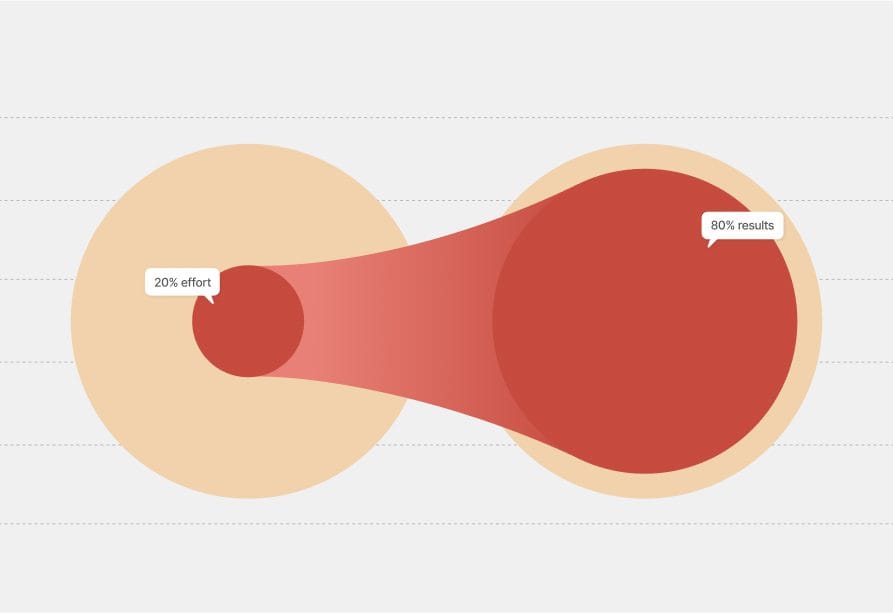
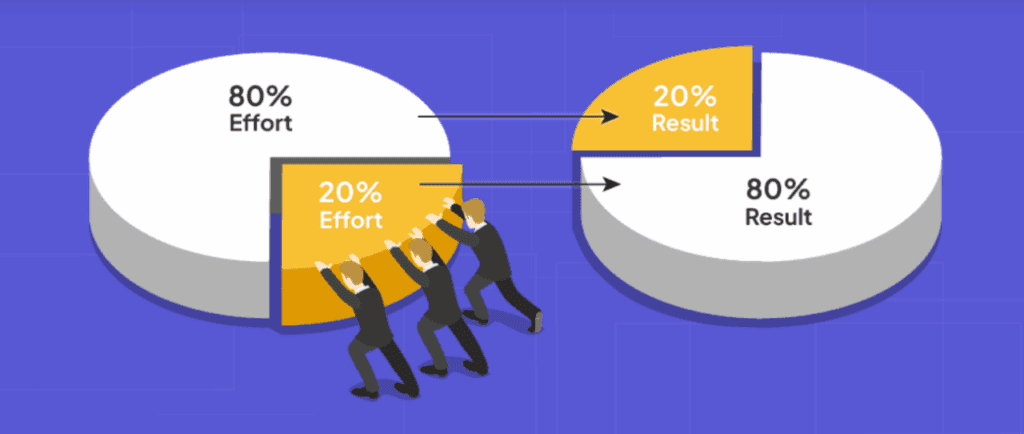
    The 80/20 rule, also known as the Pareto Principle, was first introduced by Italian economist Vilfredo Pareto in the late 19th century. Pareto observed that 80% of outcomes often come from 20% of the efforts. This principle applies to almost every area of life – from business performance to personal habits.

    In the context of productivity, the 80/20 rule encourages you to identify the 20% of tasks that generate 80% of your results – and then focus your energy on those high-impact activities.

    Fun Fact: According to research published by Harvard Business Review, professionals who prioritize their top-value tasks using Pareto’s Principle report a 25% boost in overall productivity.

    Why the 80/20 Rule is Essential for Remote Work

    When working remotely, mastering the 80/20 rule productivity is even more critical. Remote work often blurs the boundaries between professional and personal life, making getting caught up in low-priority tasks easier. By identifying and focusing on your most impactful 20% of activities, you can avoid distractions, stay organized, and deliver better results in less time. Remote workers who apply this principle effectively are more likely to maintain balance, meet deadlines, and excel in their roles.

    How to Apply the 80/20 Rule for Productivity

    1. Identify Your High-Impact Tasks

    Take a closer look at your daily to-do list. Ask yourself: Which tasks drive the most progress? Identify the top 20% of activities that contribute to 80% of your results. These are your priorities.

    Example: If you’re a content marketer, tasks like writing engaging blog posts or developing SEO strategies may generate more results than spending hours tweaking social media graphics.

    2. Eliminate or Minimize Low-Value Tasks

    Once you’ve identified your most impactful tasks, the next step is to minimize the time spent on less productive activities. Tasks like excessive emailing, unnecessary meetings, or over-editing minor details can drain your time.

    Pro Tip: Use work productivity tools like Trello, Asana, or Todoist to prioritize important tasks and streamline your workload.

    3. Delegate Where Possible

    Not everything on your plate needs to be handled by you. Delegating routine tasks to colleagues, freelancers, or virtual assistants can free up your time for what truly matters. Delegation allows you to maintain focus on your core priorities while ensuring other necessary but less critical tasks are still completed.

    Example: If you’re managing a team, delegating routine data entry, social media updates or email filtering can significantly boost your overall productivity.

    4. Use Time Management Techniques

    Combining the 80/20 rule with proven time management activities can boost your productivity even further. Consider techniques like:

    • The Pomodoro Technique (25-minute focus sessions followed by 5-minute breaks)
    • The Eisenhower Matrix (prioritizing urgent and important tasks)
    • The 2-Minute Rule (if it takes less than two minutes, do it immediately)

    These methods ensure that your most impactful 20% of tasks receive the attention they deserve.

    5. Set Clear Priorities with Visual Tools

    Visualizing your priorities can make the 80/20 plan easier to follow. Use charts, priority matrices, or task boards to visually highlight your most valuable activities.

    Tools like Notion, Monday.com, or ClickUp provide helpful visual aids to manage and track your most important tasks efficiently.

    6. Track Your Progress and Refine

    Productivity isn’t a one-size-fits-all solution. Regularly assess your progress and fine-tune your strategy. Are you dedicating enough time to your top 20% of tasks? Adjust accordingly to stay on track.

    Real-World Examples of the 80/20 Rule in Action

    • Microsoft’s Bug Management: Microsoft once reported that 80% of software errors stemmed from 20% of the code, allowing engineers to prioritize fixes more effectively.
    • Business Sales Strategy: Many sales teams find that 20% of clients generate 80% of their revenue, helping them focus on nurturing key customer relationships.
    • Fitness & Health: Many personal trainers suggest that 20% of your workout routines (like compound exercises) deliver 80% of your results for strength and endurance.

    Tools That Support the 80/20 Rule

    To maximize your focus and results, consider these popular work productivity tools:

    • RescueTime – Tracks your time to highlight high-value activities
    • Focus@Will – Provides personalized music to improve concentration
    • ClickUp – Helps you prioritize tasks in line with the 80/20 plan
    • Forest – Encourages focus by growing virtual trees when you avoid distractions

    How to Improve Attention to Detail with the 80/20 Rule

    The 80/20 rule can also improve your ability to focus on the right details. Instead of obsessing over every element of a project, focus on the key details that truly affect the outcome. For example, when designing a website, spending more time perfecting the user interface and site speed may provide greater value than spending hours adjusting button colors.

    In fields like writing, customer service, or coding, identifying the critical areas that deliver the most impact ensures you’re investing your energy where it truly counts.

    80/20 rule

    Final Thoughts

    Mastering the 80/20 rule productivity mindset can dramatically improve your focus, efficiency, and results. By identifying your most valuable tasks, cutting back on distractions, and using powerful work productivity tools, you can achieve more by doing less.

    For more insights on mastering work management, time management activities, and improving your focus, keep following WhatWorksNext — your go-to guide for working smarter, not harder.

  • High-Paying Remote Careers in 2025: Best Jobs for Future

    High-Paying Remote Careers in 2025: Best Jobs for Future

    The remote work revolution isn’t slowing down anytime soon, and if you’re aiming to land one of the high-paying remote careers in 2025 and are interested in knowing more about what remote jobs are in demand, you’re in the right place. With the right skills, dedication, and mindset, you can secure a career that offers both financial stability and flexible working conditions. But what exactly are the best remote jobs in 2025? Let’s explore the high-paying remote careers that are projected to dominate the job market.

    Why Are High-Paying Remote Jobs on the Rise?

    Remote work isn’t just a trend anymore; it’s the new norm. According to Forbes, over 25% of professional jobs in North America are expected to be remote by the end of 2025. The demand for specialized talent is driving salaries higher as companies compete to attract top remote talent. Industries such as tech, finance, and healthcare are particularly booming in this space.

    Many of these roles are not limited to full-time employment; individuals with the right skills can also thrive in these fields as freelancers or consultants, offering their expertise on a flexible, project-based basis.

    This shift toward remote flexibility is empowering professionals to design careers that align with their lifestyles while still achieving financial success. With tools and platforms now supporting seamless global collaboration, employers are no longer limited by geography when hiring top-tier talent. As a result, High-Paying Remote Careers in 2025 are becoming more accessible across borders, opening doors for individuals worldwide to secure lucrative positions in cutting-edge industries without relocating or compromising on work-life balance.

    Top High-Paying Remote Careers in 2025

    High-Paying Remote Careers in 2025 are rapidly redefining the modern workforce, offering professionals the flexibility to work from anywhere while earning impressive salaries. With advancements in technology and a global shift toward digital infrastructure, roles in software engineering, cybersecurity, AI and machine learning, digital marketing, and remote healthcare are among the most lucrative.

    These careers not only provide financial rewards but also the freedom to maintain a healthy work-life balance. As companies continue to embrace remote-first policies, High-Paying Remote Careers in 2025 will be increasingly accessible to skilled professionals worldwide.

    1. Software Developer (Tech Remote Jobs)

    Average Salary: $100,000 – $180,000/year

    The tech industry continues to lead in remote work opportunities. Companies are actively hiring full-stack developers, backend engineers, and AI specialists who can develop and maintain powerful applications. Skills in Python, JavaScript, and cloud technologies like AWS are in particularly high demand for remote jobs in tech.

    Fun Fact: The average salary for developers skilled in frameworks like React and Angular has increased by over 20% since 2023, making them some of the most lucrative skills in the remote job market.

    High-Paying Remote Careers in 2025

    2. Data Scientist

    Average Salary: $110,000 – $190,000/year

    With businesses relying heavily on data for insights and decision-making, data scientists are indispensable. If you’re skilled in Python, R, or SQL — paired with strong analytical thinking — you can command impressive salaries in this field.

    3. Cybersecurity Specialist

    Average Salary: $120,000 – $200,000/year

    As cyber threats rise, so does the demand for experts who can protect sensitive company data. Remote cybersecurity roles like security analyst, ethical hacker, or penetration tester are among the best careers for remote work in 2025.

    4. Digital Marketing Manager

    Average Salary: $90,000 – $150,000/year

    From SEO strategies to paid ad campaigns, businesses need marketing experts to boost their online presence. Roles like content strategist, SEO specialist, and email marketing manager are increasingly remote-friendly.

    5. UX/UI Designer

    Average Salary: $80,000 – $140,000/year

    Creating seamless user experiences for websites and apps has become crucial. Companies are willing to pay generously for designers who understand user behavior, wireframing, and prototyping using tools like Figma or Adobe XD.

    High-Paying Remote Careers in 2025

    6. Remote Project Manager

    Average Salary: $90,000 – $160,000/year

    Managing remote teams requires excellent organizational skills, leadership abilities, and expertise in tools like Asana, Trello, or Monday.com. Project managers with certifications like PMP (Project Management Professional) can expect higher salaries.

    7. Cloud Solutions Architect

    Average Salary: $130,000 – $210,000/year

    With businesses shifting to cloud platforms like AWS, Google Cloud, and Microsoft Azure, skilled architects who can design secure, scalable cloud infrastructures are in high demand.

    8. Online Tutor/Educator

    Average Salary: $50,000 – $100,000/year

    With online learning on the rise, tutoring has become a lucrative remote career. Specializing in fields like STEM, business, or language studies can significantly boost your earning potential.

    9. Content Strategist/Writer

    Average Salary: $70,000 – $120,000/year

    Writers skilled in SEO, copywriting, and content strategy are in high demand. Specializing in technical writing or niche industries can further increase earning potential.

    10. Virtual CFO (Chief Financial Officer)

    Average Salary: $150,000 – $250,000/year

    Many startups and small businesses now hire part-time CFOs to manage financial planning and forecasting. Expertise in financial analytics, budgeting, and tax strategies is key to this best-paying remote career.

    Verified Sources for Salary Data

    The salary figures mentioned in this article are based on data from trusted sources like the U.S. Bureau of Labor Statistics (BLS), LinkedIn Salary Insights, and Glassdoor’s Remote Work Salary Reports to ensure accuracy and credibility.

    Tips to Land High-Paying Remote Jobs in 2025

    1. Upgrade Your Tech Skills: Learn trending tools and platforms to stay competitive.
    2. Optimize Your Computer Setup: Companies offering work-from-home jobs that provide equipment often prioritize candidates who demonstrate a productive workspace.
    3. Master Remote Collaboration Tools: Platforms like Slack, Zoom, and Notion are essential for effective teamwork.
    4. Network in Remote-Work Communities: Platforms like LinkedIn, We Work Remotely, and Remote OK can connect you with top employers.
    5. Master Remote Work Ethics: Developing strong remote work habits like clear communication, time management, and accountability is key to long-term success.

    Follow WhatWorksNext for expert insights on overcoming remote work challenges and thriving in your career.

    High-Paying Remote Careers in 2025

    Final Thoughts High-Paying Remote Careers in 2025

    The above-listed jobs are only a few examples; countless other career opportunities in today’s world allow you to thrive remotely. Whether you’re an experienced professional or someone exploring work-from-home jobs that provide equipment, the future of remote work is filled with exciting opportunities. Stay ahead by upskilling, networking, and building a productive home workspace. The best-paying remote careers are waiting, go claim yours!

    As remote work continues to evolve, adaptability and continuous learning will be key to unlocking long-term success. Embracing digital tools, staying informed about industry trends, and showcasing your value in a virtual environment can set you apart in a competitive market.

    High-Paying Remote Careers in 2025 are not just about earning more—they’re about achieving professional growth, personal freedom, and long-term job satisfaction in a flexible work setting.

    Pro Tip: Remote work success isn’t just about the job — it’s also about building a routine, mastering your tools, and staying connected with your team

    WhatWorksNext is here to guide you every step of the way!

  • The Future of Remote Work: What to Expect in 2025

    The Future of Remote Work: What to Expect in 2025

    Remote work has undergone a seismic transformation since the early days of the COVID-19 pandemic. In 2020, companies across the globe pivoted to a work-from-home model to ensure business continuity. setting the stage for a permanent evolution in how we work. Today, five years later, as we look toward 2025, the future of remote work is set to undergo a significant transformation fueled by innovation, flexibility, and a growing emphasis on technology.

    As businesses continue to adapt to a digital-first environment, the future of remote work will be defined by smarter collaboration tools, AI-driven workflows, and an emphasis on employee well-being. Organizations are investing in virtual infrastructure and digital upskilling to foster a more connected and efficient remote workforce. This evolution is not just about where people work, but how they work—prioritizing results over hours logged and flexibility over rigid schedules. With these advancements, the future of remote work promises greater inclusivity, productivity, and job satisfaction across industries.

    The Evolution of Remote Work

    What started as a necessity during the pandemic is now evolving into a long-term strategy for companies and employees. Remote work isn’t going anywhere; rather, it is evolving faster than ever. Whether you are exploring part-time remote jobs or thinking of revamping your home office setup, the changes set in motion post-2020 have permanently altered the way we approach our careers in 2025.

    Understanding how to work from home as a remote employee efficiently is important. One can enhance productivity by having a disciplined routine, minimizing distractions, setting clear work goals, and using time management Prioritizing deep work over multitasking can enhance focus and performance, making remote work more effective and fulfilling.

    future of remote work

    Emerging Remote Work Trends for 2025

    1. Hybrid Work Models and Beyond: 
      Companies across the globe are now increasingly adopting hybrid models that blend remote and in-office work setups. This approach will provide flexibility for employees’ needs while maintaining healthy team meet-ups.

    2. Remote Work Trends 2025:
      Businesses are now tweaking their hiring and operational processes to attract remote talent (why not? It saves up traveling time and costs and helps maintain a healthy work-life balance; in many cases, it has shown an increase in productivity as well).

    3. Increased Freelance Opportunities: 
      Freelancing is not dead. We are seeing a rise in the gig economy, which means more professionals (from almost all industries) are exploring part-time remote jobs.

    4. Employee Well-Being and Mental Health:
      Another trend that’s gaining momentum is the needed focus on employee well-being and mental health. We all know what work stress can do to one’s mental health, hence, it was a much-needed initiative. Moreover, understanding the need, many informed businesses are now investing in wellness programs, mental health resources, and flexible work schedules to ensure that employees remain engaged, healthy, and stress-free.

    Source: Statista – Work from Home and Remote Work

    Source: GALLUP

    The Impact of AI on Remote Work (Talk of the Town)

    After the boom of AI, the past year and 2025 have seen a HUGE shift in literally everything. AI is a game-changer for the modern workplace. Innovations in AI remote work are not only making daily tasks more efficient but are also transforming the way individuals perform daily tasks and how teams communicate and collaborate. 

    From virtual AI chatbots that schedule meetings to advanced analytics that help track productivity, time management, and more! AI is proving to be an invaluable asset for remote workers. A true game changer for the ones who are ready to leverage it for their own good.

    The Perfect Home Office Setup (Remote or WFH)

    Having your own dedicated home office setup as a WFH or remote employee is a must. Without it, you’ll be struggling with focus, discipline, and time management; hence, it is worth investing in a proper home office setup. 

    Ergonomic furniture, high-speed internet, noise-canceling headphones, and good lighting can significantly improve your efficiency and reduce fatigue. Also, investing in a professional, comfortable setup positions you for long-term success as remote work continues to become a permanent fixture in the global workforce.

    There’s a lot that you can do to make it as comfortable to work in as you want, but here are a few suggestions to keep in mind:

    • Office Essentials:
      Invest in comfortable furniture. Your back is the core, and you wouldn’t want to put it at risk. It is better to have desk setups that align with your needs and perhaps an ergonomic chair as well. Also, High-quality lighting, and other office essentials that can make your home workspace more inviting and effective.

    • Improvised Computer Setup:
      A reliable computer setup is indispensable for managing virtual meetings and heavy workloads. Ensuring you have the right hardware and a fast internet connection can significantly boost your productivity. And, of course, don’t forget the laptop and monitor setup as per your job requirements.

    Preparing for the Future

    As we continue to navigate the future of remote work in the ever-evolving dynamic, both employers and employees must adapt to:

    • Continuous Learning: 
      To keep up with the pace, upskill regularly through online courses, webinars, active communities, and training sessions that align with your role. Moreover, This commitment to learning is the need of time, especially in an environment where change is constant.

    Final Thoughts About The Future of Remote Work

    WhatWorksNext in the world of remote work is already here. Chin up, and prepare yourself to navigate through the work challenges of 2025 and beyond.

    The future of remote work is evolving rapidly, shaped by technological advancements, shifting workforce expectations, and a global push for greater flexibility. Companies are reimagining their structures to support distributed teams, focusing on outcome-based performance and leveraging digital collaboration tools to maintain productivity and cohesion. As artificial intelligence and automation become more integrated into daily workflows, professionals must continuously adapt, reskill, and embrace innovation to remain competitive in this new work environment.

    Looking ahead, the future of remote work will offer unprecedented opportunities for those ready to seize them. From digital nomads traveling the world to professionals working hybrid schedules from home, the possibilities are vast. As work-life boundaries continue to blur, those who prioritize balance, build strong virtual networks, and cultivate a growth mindset will thrive. In this exciting new era, the future of remote work isn’t just about location—it’s about empowerment, autonomy, and redefining success on your own terms.

  • 11 Best Productivity Apps for Remote Workers

    11 Best Productivity Apps for Remote Workers

    In the last 5 years, remote work has transformed the way we approach our daily routines, making flexibility and efficiency more important than ever. Whether you’re juggling multiple projects or coordinating with teams across the globe, the right productivity apps for remote workers that can make all the difference, especially in 2025 which is fast-paced and more demanding. Let’s unwrap a variety of productivity apps for remote workers that not only streamline tasks but also keep you connected and in control of your workday (more work, less stress).

    Navigating the Remote Work Landscape

    Remote work has forever changed how we approach our daily routines. Did you know that remote workers save an average of 55 minutes a day by avoiding the commute? That’s nearly 5 extra hours a week that you can invest in your work or personal life!

    Today’s remote work software and team productivity apps for remote workers offer features from hassle-free communication to advanced project tracking, ensuring that whether you work from your Mac or Windows PC, your workflow remains efficient and unaffected. 

    For Mac users, checking out the best productivity apps for Mac can lead you to tools designed specifically to leverage macOS’s unique capabilities and vice versa for Windows. 

    Essential Features to Look For Productivity Apps for Remote Workers

    When choosing Productivity Apps for Remote Workers, it’s crucial to look for features that support focus, collaboration, and task management. Tools with real-time communication, seamless integration across devices, calendar syncing, project tracking, and file sharing capabilities can significantly enhance efficiency.

    Additionally, features like time tracking, distraction blockers, and automated reminders help remote professionals stay organized and accountable throughout the workday. The right Productivity Apps for Remote Workers empower individuals to manage their workload effectively, maintain work-life balance, and collaborate effortlessly with distributed teams.

    • User-Friendly Interface:
      A clean, intuitive, easy-to-navigate interface helps you jump right in! Because every minute counts.

    Fun fact: 72% of remote workers report that a good interface increases their satisfaction!

    • Collaboration Tools:
      Real-time chat, video conferencing, project collaborations, messaging, and file sharing help keep your team connected, no matter the distance. Many decent remote work project management tools integrate with these features for enhanced productivity. Let’s talk about the apps a little later in the blog. 
    • Cross-Platform Availability:
      Whether using a Mac, PC, or mobile device, choosing productivity apps for remote work that work across all platforms is a must!
    • Reliable Connectivity:
      Since remote work depends heavily on your internet, meeting remote work internet requirements is essential for keeping your workflow uninterrupted. So make sure you have a stable internet connection, and with Starlink already booming the industry, you can connect from anywhere.

    Fun Facts And Stats to Inspire You with Productivity Apps for Remote Workers

    • Productivity Boost:
      Studies suggest that remote workers can be 35-40% more productive than their office-based counterparts. Imagine getting that much more done simply by working in an environment you feel comfortable and productive in!

    • More Savings:
      Companies are saving big, with up to $10,600 saved per employee per year by reducing office expenses. At the same time, remote workers themselves can save up to $12,000 annually on commuting, food, and related costs.

    • Work-Life Balance:
      Approximately 95% of workers want at least some remote work in their schedule (full remote or hybrid), proving that the freedom to work from home is highly valued and can enhance their overall well-being and work-life balance. 

    • Digital Transformation:
      Over 80% of professionals believe that AI-powered productivity tools help them focus on high-impact tasks rather than getting bogged down by routine work and repetitive tasks.

    • Future Outlook:
      The future outlook for remote work is promising as continuous tech advancements and evolving work models drive higher productivity and improved work-life balance. With more companies embracing flexible, hybrid arrangements and AI-enhanced tools, employees and organizations alike can look forward to a more efficient and innovative work environment in the coming years.
    Best Productivity Apps for Remote Workers

    Top Categories of Productivity Apps For Remote Workers

    1. Remote Work Project Management Tools

    For organizing tasks and tracking progress, project management apps like Trello, Basecamp, Todoist, Asana, and Monday.com can serve as your best friends. 

    Let’s see what each tool has to offer:

    A versatile project management tool that utilizes an easy-to-use card-based dashboard to help teams organize tasks and collaborate efficiently. Its intuitive design allows users to create boards, lists, and cards to manage projects of any size.

    Key Features:

    • Kanban boards for visual task management.
    • Customizable workflows.
    • Integration with a huge array of apps and services, making it easier to switch between tasks.
    • Offers a free plan to get you started.

    Asana

    Asana is a comprehensive project management platform designed to help teams orchestrate their work, from daily tasks to complex strategic initiatives. It offers a decent range of features to plan, organize, and manage workflows effectively.

    Key Features:

    • Task lists, timelines, and various project views.
    • Advanced task management with dependencies.
    • Integration with tools like Microsoft Teams.
    • Offers a free personal plan with no additional costs.

    Basecamp

    A project management and team collaboration software that consolidates various tools into a single platform. It emphasizes simplicity and usability, making it suitable for remote teams seeking straightforward project management solutions.

    Key Features:

    • Message boards for clear team communication with what to do and who’s doing it info.
    • To-do lists for efficient task management.
    • Campfire chat rooms for casual discussions.
    • Offers dedicated visual tools like Lineup, Mission Control, and Hill Charts to help you see where projects stand and what’s next. 
    • Comes with a free plan to get you started without a sweat.  

    Todoist

    A versatile task management and to-do list application designed to help individuals and teams organize their work and personal tasks efficiently. A perfect scoop for remote workers and WFH employees. With a clean and intuitive interface, Todoist enables users to capture tasks quickly, set priorities, and monitor progress across various projects.

    • Create tasks with due dates, assign priorities, and categorize them into projects for structured management.
    • Accessible on multiple platforms, including web, iOS, Android, Windows, and macOS, ensuring smooth synchronization across devices.
    • Offers a free version with essential features suitable for individual use.

    Monday.com

    A cloud-based work operating system that enables organizations to create custom workflow applications without the need for coding. Its flexibility caters to various industries and team sizes, offering a visual and intuitive interface.

    Key Features:

    • Offers customizable workflows and boards allowing improved efficiency and productivity.
    • Integration with various tools like Zoom and Slack.
    • Automation of repetitive tasks to save time. 
    •  AI-driven features, including an AI enterprise-service management product and AI agents for incident resolution.

    Fun fact: Teams using these tools report saving up to 400 hours per year on meeting time alone! How cool is that?

    Productivity Apps for Remote Workers

    2. Communication and Collaboration Platforms

    Effective and clear communication with comprehension is the backbone of remote work. Apps such as Slack, Chanty, Microsoft Teams, and Zoom allow for smooth interactions, ensuring everyone stays on the same page. 

    Slack 

    Slack is a messaging platform designed for teams, offering real-time messaging, document sharing, and powerful search capabilities. It’s a communication powerhouse for teams, especially the ones working remotely.  It organizes conversations into channels, making collaboration more structured and accessible for all.

    Key Features:

    • Channels for organized conversations.
    • Direct messaging and file sharing.
    • Integration with various apps and services.
    • Huddles for audio and video calls.
    • App integration options 
    • Record clips and images to share updates
    • Offers a free plan 

    Microsoft Teams: 

    Microsoft Teams is a collaboration platform that combines chat, video meetings, file storage, and application integration. It’s part of the Microsoft 365 suite, providing seamless integration with other Microsoft services.

    Key Features:

    • Allows to organize groups into teams and subdivide discussions into topic-specific channels.
    • Meetings and conferencing without any disruptions
    • Sharing and collaboration on files within chats and channels, with real-time co-authoring.
    • Ability to collaborate visually during meetings using a shared digital canvas for brainstorming.

    Zoom

    Zoom is a video communications platform that offers video conferencing, webinars, and screen sharing. It’s widely used for virtual meetings, providing high-quality video and audio.

    Key Features:

    • Offers video and audio conferencing.
    • Dedicated break rooms during webinars and virtual conferences.
    • Screen sharing and recording.
    • Waiting rooms to control participant entry by placing attendees in a virtual waiting area.
    • Integration with multiple apps and calendars.
    • Offers a free plan (with meetings up to 40 minutes).

    Fun fact: Did you know that 83% of remote employees spend up to one-third of their workweek in meetings? With the right tools, you can streamline these meetings and focus on what truly matters. (the word meeting is horrifying itself). 

    3. Note-taking and Organization Apps

    Apps like Evernote and Notion help capture ideas and organize your tasks, so you never lose a great thought. 

    Evernote 

    Evernote is a note-taking and organization app that allows users to capture ideas, tasks, and important information in various formats. It synchronizes across devices, ensuring access to notes anytime, anywhere.

    Key Features:

    • Note creation with text, images, and files.
    • Task management with reminders.
    • Synchronization across devices.
    • Offers both free and paid plans (free for everyone without any hidden costs).

    Notion is an all-in-one workspace that combines notes, tasks, and wikis. It offers customizable templates and databases, allowing teams to tailor the platform to their specific needs.

    Key Features:

    • Customizable templates for notes and tasks.
    • Databases and calendars for organization.
    • Collaboration with team members.
    • Offers multiple plans for both individuals and teams (free and paid).
    • App integrations with Slack, Github, and more.

    Fun fact: Remote workers who use organized note-taking systems are 22% more likely to hit their deadlines!

    4. Specialized Apps for Mac Users

    For macOS enthusiasts, apps such as Things, and OmniFocus offer a smooth and integrated experience that maximizes your productivity. Their smooth design and Mac-specific features ensure that your work environment is as efficient as possible.

    Things

    It is a task management app designed specifically for macOS, offering a clean and intuitive interface that helps users manage their to-do lists and projects efficiently. It integrates deeply with macOS features and provides a seamless experience across Apple devices.

    Key Features:

    • Overview of your tasks for the day and upcoming tasks in one place.
    • Organize tasks into projects and areas of responsibility, with easy drag-and-drop functionality.
    • Categorize tasks with tags to easily find and filter through them.
    • Keep your tasks updated across all your Apple devices with Things Cloud.

    OmniFocus

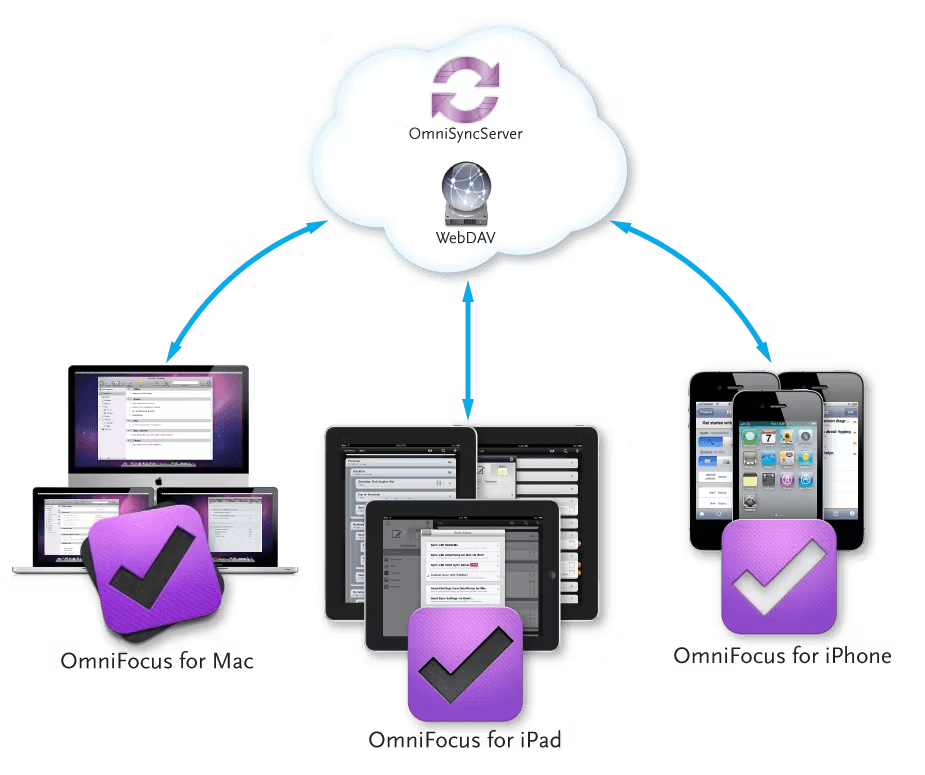
    OmniFocus is a powerful task manager for macOS that offers a highly customizable and detailed approach to personal and professional productivity. It allows users to organize their tasks using multiple perspectives and filter by context, project, or priority.

    Key Features:

    • Personalized views to focus on tasks based on your workflow and priorities.
    • Set deadlines for tasks and get notifications for the same.
    • Allows you to automate repetitive tasks with customizable recurrence settings.
    • Sync tasks across all Apple devices using Omni Sync Server or iCloud.

    Making the Right Choice for You

    With so many options available, evaluate your workflow and choose the apps that best match your needs:

    • Integration: Ensure the app integrates well with your existing tools.
    • Scalability: Consider if the app will grow with your team.
    • Support and Updates: Look for reliable customer support and regular updates to keep your tools current.

    Ending Thoughts

    The digital age has ushered in a new era of flexibility, where the right productivity apps for remote work can transform your work-from-home experience into one that is efficient, productive, engaging, and ultimately successful. 

    Happy remote working, and here’s to boosting productivity one app at a time. 

    As remote work continues to become the standard across many industries, leveraging the right productivity apps for remote work can make all the difference in achieving peak performance. From project management platforms like Trello and Asana to communication tools such as Slack and Zoom, these apps streamline workflows, enhance team collaboration, and reduce the friction of distance. Choosing tools that align with your specific work style and team needs ensures you stay organized, connected, and focused, no matter where you’re working from.

    Looking ahead, the future of remote productivity will be shaped by AI-powered tools, smarter automation, and personalized digital workspaces. As technology continues to evolve, so too will the capabilities of productivity apps for remote work, making them even more intuitive and adaptive to individual needs.

    By staying current with the latest innovations and committing to continual improvement, remote professionals can create a work environment that supports both efficiency and well-being.

    Subscribe to WhatWorksNext today and join a community dedicated to transforming the way we work. Working smarter starts here!